 Back to articles

The anatomy of a deep Salesforce sync integration

Ayan Barua
CEO
Salesforce’s decision to acquire Qualified is a useful signal flare for anyone building customer-facing AI software on top of the CRM - the system of record for revenue teams. Salesforce did not buy a “chat widget.” They bought a company that marketed itself as deeply native to Salesforce, because the thing that wins enterprise deals is not your model demo; it is whether your product can safely read, react, and write within the customer’s system of record without creating chaos.
In this post, I am going to break down the anatomy of a deep, API-based Salesforce sync integration, including backfill and incremental reads, field-scoped change events, bi-directional write-back with guardrails, schema drift monitoring, and the operational observability that makes the whole thing trustworthy. I will also show how Ampersand packages these primitives into a repeatable integration surface, so AI-native B2B companies can build Salesforce experiences that feel native to customers without spending a year reinventing the sync machinery.
Why “deep Salesforce sync” suddenly matters more in the age of AI agents
Salesforce is not “just another integration” for enterprise customers. It is where pipeline lives, where account ownership lives, where data gets audited, and where internal teams decide what is true. On top of that, every Salesforce org/tenant is heavily customized.
If you are building an AI-native B2B product, this matters even more because agents do not just read CRM data. Agents act on it. They enrich records, log activity, update fields, trigger downstream workflows, and decide what should happen next. At that point, your Salesforce integration stops being a reporting pipe and becomes part of your product’s control loop.
When the sync is stale, your agent makes decisions based on outdated data. When the sync is noisy, your agent spends half its time reacting to fake changes. When the sync is unsafe, your agent becomes the intern who confidently overwrites a human’s carefully curated account notes.
None of that is a model problem. It is an integration problem.
Common failure mode: You start with polling and a basic backfill, and the integration looks fine until the first enterprise customer adds custom fields, hits API limits, and asks why updates are missing.
What Ampersand does instead: You compose read, subscribe, and write into a declarative, deterministic system with stable mapping contracts, schema drift awareness, and operational observability.
Why it matters for enterprise: Enterprises are increasingly less forgiving about AI hallucinations. Get your sync the first time around.
What most teams think “deep” means (and why they are wrong)
A lot of teams define “deep Salesforce integration” as “we use OAuth and we sync Accounts and Contacts.” That is not deep. That is the start of the project.
Deep means your integration holds up when:
- the org has custom objects and custom fields,
- admins change the schema (because they will as the org evolves),
- the data set is large enough that backfills are real operations,
- your product needs bi-directional workflows, not just ingestion,
- and your support team needs to debug issues quickly without reverse engineering everything from ad hoc logs.
Deep is not a single feature. It is the discipline of making sync boring, predictable, and safe.
The real anatomy of a deep Salesforce integration
A deep integration has explicit stages and explicit contracts. Here is the shape that works in production.
                 +----------------------+
                 |   Your SaaS / Agent  |
                 |  (app + workflows)   |
                 +----------+-----------+
                            |
                            | Install + configure mappings
                            v
+---------------------------+---------------------------+
|                        Ampersand                      |
|  - Read Actions (backfill + scheduled + trigger read)  |
|  - Subscribe Actions (field-scoped change events)      |
|  - Write Actions (sync/async + retries + guardrails)   |
|  - Proxy Actions (passthrough endpoints when needed)   |
|  - Schema Watch (field created/deleted/changed)        |
|  - Destinations + Notifications                        |
|  - Operations + Logs                                   |
+-----------+----------------------+---------------------+
            |                      |
            | API calls            | Webhooks / stream events
            v                      v
     +------+--------+      +------+-------------------+
     |   Salesforce  |      | Your webhook receiver or |
     | (customer org)|      | streaming consumer       |
     +---------------+      +--------------------------+
The “depth” is the composition:
- Read gives you completeness and steady sync.
- Subscribe gives you near-instant signals for change.
- Write lets your product act with guardrails.
- Mapping keeps your contract stable across customers and custom fields.
- Schema watch keeps you correct as orgs evolve.
- Operations and logs let you debug real incidents without guesswork.
Read: backfill plus incremental without melting API limits
Read Actions are the foundation. They are how you get an initial snapshot and how you keep your view of a customer org current over time.
A Read Action defines:
- the object you want to read,
- a destination where results are delivered,
- optional backfill behavior (none, bounded window, or full history),
- and optional scheduling, plus a trigger read mode when you want explicit control.
Common failure mode: “Backfill everything on install” meets a customer with a large org, and the first impression becomes a backfill storm.
What Ampersand does instead: You choose backfill intentionally, schedule reads conservatively, and trigger reads when you want tighter control over timing.
Why it matters for enterprise: Backfill is not a checkbox. It is an operational workload with real limits and real consequences.
Code sample 1: amp.yaml object + field mapping (including nested field mapping)
specVersion: 1.0.0
integrations:
  - name: deepSalesforceSync
    displayName: Deep Salesforce Sync
    provider: salesforce

    read:
      objects:
        - objectName: account
          mapToName: company
          destination: crmWebhook
          schedule: "*/10 * * * *"
          backfill:
            defaultPeriod:
              days: 30
          requiredFields:
            - fieldName: id
            - fieldName: name
              mapToName: accountName
          optionalFieldsAuto: all

        # Nested field mapping example for nested provider payloads
        - objectName: contacts
          destination: crmWebhook
          requiredFields:
            - fieldName: $['userInfo']['email']
              mapToName: contactEmail
            - fieldName: $['userInfo']['name']
              mapToName: contactName

    write:
      objects:
        - objectName: account
          inheritMapping: true
Nested field mapping uses JSONPath bracket notation, and the same mappings apply in reverse on writes. This is what turns mapping into a deterministic transform layer instead of a pile of one-off adapters.
Subscribe: stop polling, stop SystemModstamp pain, ship only meaningful changes
Subscribe Actions deliver near-instant webhook events when records are created, updated, or deleted. Subscribe Actions are supported for Salesforce, HubSpot, Zoho, etc (the first events can take 1 to 2 minutes to arrive after installation, sometimes longer, but after that it's instantaneous).
The key idea is field-scoped watching:
- You can watch all fields with
watchFieldsAuto: all. - Or you can list fields explicitly using
requiredWatchFields. - Only one of these should be provided.
Subscribe Actions inherit fields and mappings from Read Actions, and inheritFieldsAndMapping must be set to true today.
Common failure mode: Timestamp movement looks like meaningful change, and your system resyncs an org even though nothing your product cares about changed.
What Ampersand does instead: You subscribe to the fields that matter, and you inspect rawEvent.ChangeEventHeader.changedFields to decide whether a change is meaningful.
Why it matters for enterprise: You reduce noise, reduce infra burn, and keep your product’s state aligned with the customer’s intent.
Code sample 2: Subscribe config with field-scoped updates
specVersion: 1.0.0
integrations:
  - name: subscribeToSalesforce
    provider: salesforce

    subscribe:
      objects:
        - objectName: account
          destination: crmWebhook
          inheritFieldsAndMapping: true
          createEvent:
            enabled: always
          updateEvent:
            enabled: always
            requiredWatchFields:
              - phone
              - notes
              - accountName
          deleteEvent:
            enabled: always

    read:
      objects:
        - objectName: account
          mapToName: company
          destination: crmWebhook
          requiredFields:
            - fieldName: id
            - fieldName: name
              mapToName: accountName
            - mapToName: notes
              mapToDisplayName: Notes
              prompt: Select the field that contains notes for this account
Code sample 3: Subscribe payload highlighting changed fields and consumer metadata
{
  "data": {
    "action": "subscribe",
    "provider": "salesforce",
    "groupRef": "webhook-demo-group-id",
    "groupName": "webhook-demo-group-name",
    "consumerRef": "user-id",
    "consumerName": "user-name",
    "installationId": "0c9230e1c-8fbe-4b28-bf10-2beee8fbf4ce",
    "objectName": "company",
    "operationTime": "2025-04-10T23:22:25.000Z",
    "result": [
      {
        "subscribeEventType": "update",
        "providerEventType": "UPDATE",
        "rawEvent": {
          "ChangeEventHeader": {
            "changeType": "UPDATE",
            "changedFields": ["Description", "LastModifiedDate"],
            "recordId": "001Dp00000ZDgmxIAD",
            "transactionKey": "00051705-2e99-d1e5-7e7a-48e3af682d07",
            "sequenceNumber": 1
          }
        }
      }
    ]
  }
}
If you have ever been bitten by SystemModstamp churn, the practical fix is simple: stop treating “timestamp changed” as “business changed.” Scope updates to fields that matter, then filter using changedFields so you only react when your product’s contract actually changed.
Write: bi-directional sync with guardrails that keep customer data safe
Write Actions make your integration feel native, and they are also where teams accidentally destroy trust.
Ampersand Write Actions support:
- create and update,
- shared mappings with Read and Subscribe Actions,
- synchronous and asynchronous modes,
- checking the status of async operations via an Operations API,
- retry policies for async writes (default deadline is one hour, configurable up to 48 hours),
- default values,
- removing unmapped fields,
- and overwrite prevention so you do not clobber customer data.
Two provider-specific facts matter:
- Creating associations while creating a record is currently only supported for HubSpot.
- Passing additional headers in create or update requests is currently only supported for Salesforce.
Common failure mode: You write back an AI-generated value and overwrite something a human maintains, and you lose the customer’s trust instantly.
What Ampersand does instead: You can configure per-field write behavior and overwrite rules, so your product writes what it should and leaves the rest alone.
Why it matters for enterprise: Writes are not just about capability. Writes are about safety.
Code sample 4: Write API call using async mode with a retry policy
curl --location 'https://write.withampersand.com/v1/projects/<PROJECT_ID>/integrations/<INTEGRATION_ID>/objects/contact' \
--header 'X-Api-Key: YOUR_AMPERSAND_KEY' \
--header 'Content-Type: application/json' \
--data '{
  "groupRef": "customer-123",
  "type": "create",
  "mode": "asynchronous",
  "retryPolicy": { "deadlineHours": 24 },
  "record": {
    "firstname": "Jane",
    "lastname": "Smith",
    "email": "jane@example.com"
  }
}'
Write also supports a batch array of 1 to 100 records. Note: partial writes are not supported yet, and if any record in a batch is invalid, the whole batch fails.
The batch response schema includes per-record results and success and failure counts. If you choose batch writes, you should choose them intentionally, because atomic failure semantics are sometimes the correct tradeoff for correctness.
Schema reality: custom fields, schema drift, and how you stay correct over time
Salesforce orgs change constantly. A deep integration assumes schema drift is normal.
Ampersand helps in a few complementary ways:
Field selection that includes custom fields
Reads can enable selection from all fields, including custom fields, using optionalFieldsAuto: all. You can also define optional mapped fields with prompts so customers map the right custom field during installation. This is the pragmatic way to deal with “every customer stores this concept differently.”
Mapping that stays consistent across read and write
When you share mappings, your app can operate on stable names, and Ampersand translates to the correct provider field for each customer org. If a field is not mapped, Ampersand can remove it during write execution, which avoids provider errors and keeps writes predictable.
Schema change monitoring with watchSchema
Ampersand supports schema change detection on customer installations. You configure a schedule (no more than once per hour, default once per day), pick event types like fieldCreated, fieldDeleted, and fieldChanged, and deliver those events to a destination. The webhook message includes created, deleted, and changed fields, including old and new schema details for changed fields.
Common failure mode: A customer adds or changes a field and your integration silently stops doing the right thing, then you find out weeks later.
What Ampersand does instead: Schema changes become explicit signals you can route into a workflow that prompts users to remap fields or confirm whether to include new fields.
Why it matters for enterprise: Schema drift is one of the most common causes of “it stopped syncing” tickets.
Observability: how you keep support tickets from becoming engineering incidents
Deep integrations are operational products. If your support team cannot answer “what happened?” with confidence, every integration issue becomes an engineering fire drill, and every agentic workflow becomes harder to trust.
Ampersand gives you concrete observability primitives, both in the delivery layer and in the execution layer.
Delivery-layer observability for webhooks and destinations
- Webhook payloads are capped at 300 KB. If a single record exceeds that limit, the webhook includes a signed
downloadUrlinresultInfo, and the URL expires after 15 minutes. - Ampersand sends a cryptographic signature for webhook payloads using Svix via the
svix-signatureheader, and each destination has its own signing secret. - By default, Ampersand sends up to 1000 webhook messages per second across all destinations, and this limit can be adjusted by request.
Notifications include installation and connection lifecycle events such as:
installation.created,installation.updated,installation.deletedconnection.created,connection.errorread.backfill.doneread.schedule.pauseddestination.webhook.disabled
These events carry useful context like provider, groupRef, and consumerRef, which makes them directly useful for customer support workflows.
Operational observability is core to the Ampersand platform
In the enterprise, “the sync ran” is not a useful sentence. The useful sentence is: what ran, for which customer org, what did we attempt, what did the provider return, and what should happen next.
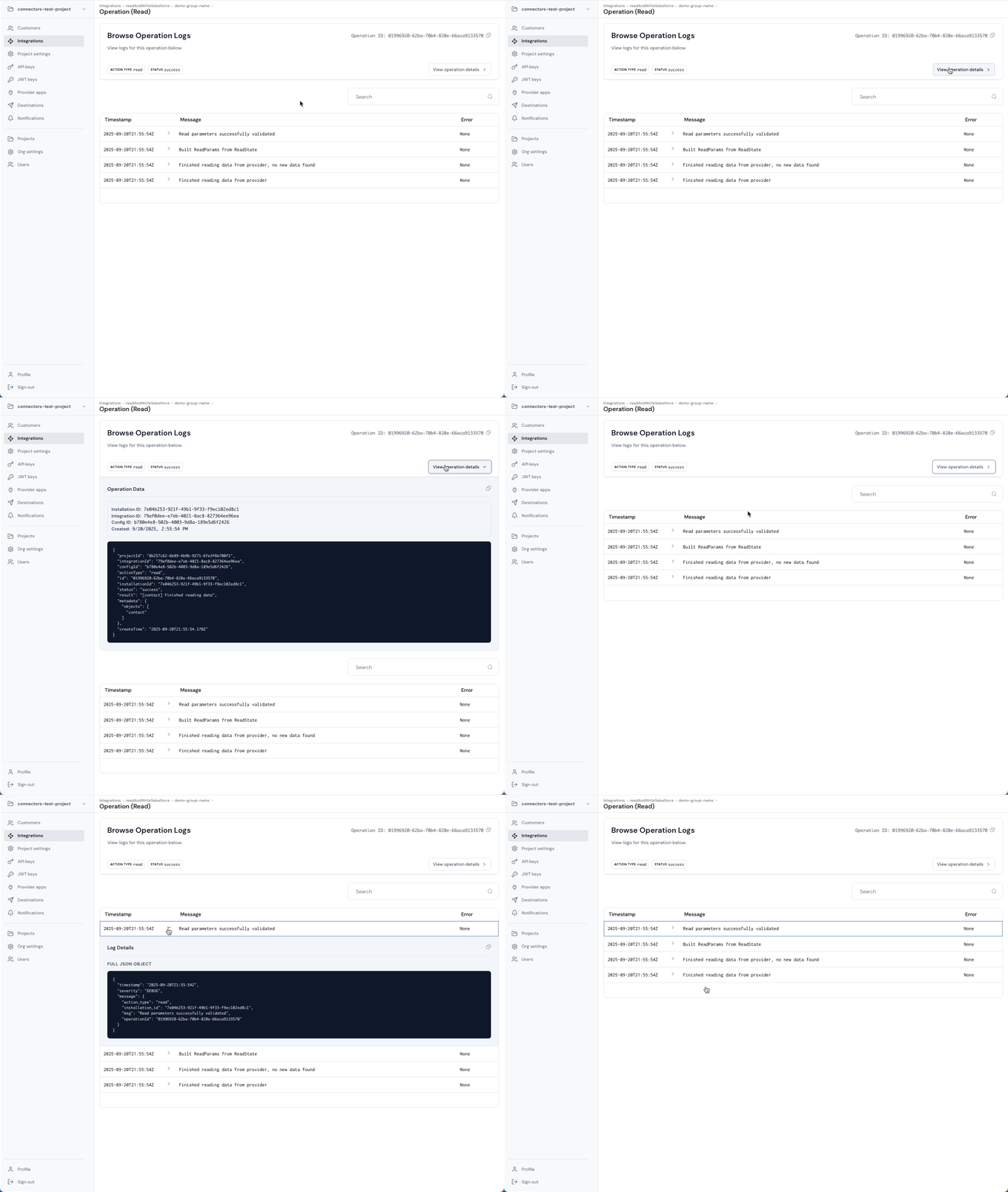
Ampersand treats observability as a core platform primitive by modeling work as Operations, and attaching structured logs to each operation. This is what lets your team debug incidents without guessing.
Common failure mode: A write fails and your customer asks why, and you have a generic HTTP error and no root cause.
What Ampersand does instead: Reads and writes produce operation records with durable identifiers and attached logs that include structured error details.
Why it matters for enterprise: Customers do not churn because something failed once. They churn because you cannot explain what happened, and they cannot trust you to detect and fix issues quickly.
Operations include identifiers like projectId, integrationId, installationId, configId, plus the actionType, status, and timestamps. Logs include timestamp, severity, and a structured message that can include an error object with subsystem context, request identifiers, retry hints, and human-readable causes and remedies. This is exactly what you want when the true cause is something like “token refresh failed,” not “write failed.”
If you store operationId for async writes, your debugging workflow becomes simple: fetch the operation, fetch its logs, and attach the structured root cause to the ticket.
curl --location 'https://api.withampersand.com/v1/projects/<PROJECT>/operations/<OPERATION_ID>' \
  --header 'X-Api-Key: <API_KEY>'
curl --location 'https://api.withampersand.com/v1/projects/<PROJECT>/operations/<OPERATION_ID>/logs' \
  --header 'X-Api-Key: <API_KEY>'
One caveat to keep in mind: Subscribe Actions do not currently produce Operations or Logs that can be viewed in the Ampersand dashboard. In practice, you treat your destination stream or webhook receiver as your canonical event log for subscribe traffic, and you still rely on Operations for read and write execution trails.
Code sample 5: Idempotent subscribe processing with noise filtering
type ChangeHeader = {
  transactionKey?: string;
  sequenceNumber?: number;
  recordId?: string;
  changedFields?: string[];
};

type SubscribeMessage = {
  provider: string;
  installationId: string;
  result: Array<{
    subscribeEventType: "create" | "update" | "delete";
    rawEvent?: { ChangeEventHeader?: ChangeHeader };
    fields?: Record<string, unknown>;
    mappedFields?: Record<string, unknown>;
  }>;
};

const IMPORTANT_FIELDS = new Set(["Name", "Description", "OwnerId"]);

function idKey(h?: ChangeHeader) {
  const tx = h?.transactionKey ?? "no-tx";
  const seq = h?.sequenceNumber ?? 0;
  const rid = h?.recordId ?? "no-record";
  return `${rid}:${tx}:${seq}`;
}

export async function handleSubscribe(msg: SubscribeMessage) {
  if (msg.provider !== "salesforce") return;

  for (const entry of msg.result) {
    const header = entry.rawEvent?.ChangeEventHeader;
    const key = idKey(header);

    if (await alreadyProcessed(key)) continue;

    if (entry.subscribeEventType === "update") {
      const changed = new Set(header?.changedFields ?? []);
      const meaningful = [...IMPORTANT_FIELDS].some((f) => changed.has(f));
      if (!meaningful) {
        await markProcessed(key);
        continue;
      }
    }

    await processChange({
      installationId: msg.installationId,
      eventType: entry.subscribeEventType,
      fields: entry.fields ?? {},
      mappedFields: entry.mappedFields ?? {}
    });

    await markProcessed(key);
  }
}

async function alreadyProcessed(_key: string) { return false; }
async function markProcessed(_key: string) { }
async function processChange(_input: any) { }
Implementation walkthrough: the smallest path to production
If you want the minimal production-ready path:
- Define
amp.yamlfor read, subscribe, and write.- Keep required fields minimal.
- Use optional fields and prompts to handle customer-specific custom fields.
- Scope Subscribe updates to the fields that matter.
- Share mappings between read and write.
- Create destinations.
- Start with webhooks.
- Use Kinesis if your architecture is stream-first.
- Build the install and mapping flow.
- Use UI components or Headless UI.
- Store
groupRefandinstallationIdin your system.
- Build a webhook consumer that is production-grade.
- Verify Svix signatures.
- Handle large payloads via
downloadUrl. - Dedupe events and filter updates based on
changedFields.
- Add write-back safely.
- Use sync for interactive flows.
- Use async for durability and retries, and store
operationId.
A depth checklist you can steal
- The customer has Salesforce API access enabled in their edition.
- Connected App is configured with a refresh token policy and permitted users' settings.
- Integration user profile includes the right object and field permissions, and the additional permissions required for Subscribe.
- Read backfill behavior is intentional, not default to "everything".
- Schedules are conservative, and trigger reads are used when timing matters.
- Optional fields and prompts handle per-customer custom fields.
- Nested field mapping is used when provider payloads are nested.
- Subscribe updates are field-scoped where possible.
- Subscribe handler dedupes events and filters using
changedFields. - Writes share mappings and include overwrite prevention.
- Async writes use retry deadlines that match enterprise expectations.
- Your system stores
operationIdand can fetch operations and logs on demand. - Webhooks verify signatures, handle payload limits, and surface delivery failures.
- Schema watch is enabled when the schema drift risk is high.
- Proxy Actions exist for escape hatch endpoints.
- You explicitly call out what you do not do, like distributing a Salesforce AppExchange managed package.
What is next on the roadmap
A few roadmap items that we are working on:
- Read Actions: letting users define their own sync schedules.
- Write Actions: programmatically creating custom objects during installation.
- Search Action: Abstraction on top of SOQL that adds querying and filtering capabilities (you can still accomplish this through Proxy Action, but Search makes it a more robust developer experience)
Closing: what to build now that sync is reliable
Once your Salesforce sync is reliable, predictable, and safe, you stop spending engineering cycles on integration fires and start building product.
You can ship agent workflows that react to real changes instead of timestamp churn. You can write back with guardrails instead of fear. You can support enterprises without turning every ticket into a detective story.
Deep Salesforce integration is not a single feature. It is a system that stays correct as orgs evolve, and stays debuggable when something goes wrong. That is the standard enterprise customers expect, and it is the standard Ampersand is designed to meet.
Start building now for free: create a project, connect a Salesforce sandbox, and watch real change events flow in minutes. Or, if you want to go straight to the details, read the docs and copy the YAML snippets from this post into your repo.