 Back to articles

CRM API Integration: How to Build Customer-Facing CRM Integrations
How to design multi-tenant, real-time, bi-directional CRM integrations that actually work in production

Chris Lopez
Founding GTM
CRM API Integration: How to Build Customer-Facing CRM Integrations
What CRM API Integration Means for SaaS Products
CRM API integration is the process of connecting CRM platforms with other software through their APIs. For SaaS products, CRM integrations usually fall into two categories, each creating a different engineering challenge.
Internal CRM integration connects your company’s own CRM to internal tools. Your team works with one set of credentials, maps one known schema to another, and maintains a single connection. Because your team controls the environment, the integration scope stays relatively fixed and predictable.
Customer-facing CRM integration works very differently. Your product must connect separately to each customer’s CRM instance, and each customer brings a different OAuth setup, custom fields and objects, schema choices, and expectations for how data should move between systems. A sales intelligence company serving 200 mid-market accounts is supporting 200 separate CRM environments, each with its own configuration.
Customer-facing CRM integration creates a much broader engineering problem than simply connecting one application to another. Your product needs an integration layer that handles multi-tenant authentication, customer-specific schema differences, bidirectional data synchronization, and production-grade reliability across multiple CRM instances simultaneously. In addition, shipping a customer-facing product adds a high-quality bar for shipping a strong, scalable product.
Enterprise buyers now expect native CRM integrations as a baseline product capability. A deal can stall quickly when a prospect depends on custom Salesforce objects, and your product cannot reliably support the required sync. Companies that win enterprise accounts have an integration layer that fully handles real customer CRM environments, including configurations well beyond the defaults.
Core Requirements of Customer-Facing CRM System Integration
Customer-facing CRM integrations create five architectural requirements that internal integration projects usually do not face. Each requirement adds operational and engineering complexity, and the complexity grows as the customer base expands.
Multi-Tenant Authentication and Credential Management
Every customer who connects a CRM through your product brings a separate set of OAuth credentials. Your integration layer must store tokens, manage refresh cycles, and handle re-authentication flows for hundreds of tenants simultaneously. Each tenant’s credentials must remain fully isolated from those of every other tenant.
A single-tenant integration can store one API key or one OAuth token and stop there. A multi-tenant CRM integration layer must refresh tokens automatically for each tenant, store credentials in a way that prevents a breach in one tenant from exposing another tenant’s credentials, and surface clear re-authentication flows when a customer’s token expires or is revoked. Teams that underestimate credential management often end up with an integration system where a single expired token causes cascading failures, or where debugging one tenant’s authentication problem requires searching through logs shared across the entire customer base.
Some integration solutions stop here, but this is often the very first piece needed for strong scalable, integration infrastructure.
Per-Customer Schema Variation and Custom Objects
Enterprise CRM instances rarely run on default configurations. Salesforce orgs at mid-market and enterprise companies often include custom objects such as Territory__c or Deal_Risk_Score__c, and each custom object can include dozens of custom fields that support the company’s go-to-market workflows. HubSpot, Dynamics 365, and Pipedrive deployments follow similar customization patterns.
Your integration layer must read from and write to objects and fields that vary across tenants. A standard schema mapping for Contacts, Accounts, and Opportunities may work for one customer and fail for another customer whose revenue process depends on custom objects. Per-customer field mapping is a core product requirement. When your integration cannot support the CRM configuration a customer has already built, the customer will either not adopt the product or churn after the integration fails to support the required workflow.
Bidirectional CRM Data Sync and Conflict Resolution
Customer-facing CRM integrations eventually need write operations, not just read access. Your product must push enriched or transformed data back into each customer’s CRM and pull updates when CRM records change. A sales intelligence product that enriches contact records, for example, must write enriched data back to Salesforce while also staying current when a sales rep manually updates the same contact.
Bidirectional sync makes conflict resolution unavoidable. When the same record changes in your product and in the customer’s CRM during the same sync window, the integration layer needs a defined rule for deciding which change wins. Common approaches include last-write-wins, which is simple but can overwrite intentional changes; field-level merge, which is more precise but harder to implement; and system-of-record rules, where one system remains authoritative for specific fields. The right conflict resolution model often depends on the data type and the customer’s workflow, so conflict resolution may require tenant-level configuration.
Real-Time Webhook Architecture vs. Polling
The sync model determines which product experiences your CRM integration can support. Polling checks for CRM changes at fixed intervals, often every 15 to 30 seconds at best and sometimes as slowly as every 24 hours in cached architectures. Polling can work for batch pipelines and scheduled reporting, but polling does not support product experiences that depend on fresh CRM data in real time.
AI voice agents, conversational sales assistants, and live workflow automation require CRM data at sub-second speeds. A voice agent that waits 15 to 30 seconds for the next polling cycle to return account history creates a poor user experience. Event-driven webhook architectures deliver CRM changes as they occur. Building reliable webhook infrastructure requires tenant-specific webhook registration, delivery confirmation, retry logic, idempotent event processing to handle duplicate deliveries, and tenant-level rate limiting to prevent one high-volume customer from consuming resources needed by other customers - also known as the noisy neighbor.
Observability, Error Handling, and Tenant-Level Debugging
When a CRM sync fails for one customer, your team must isolate and diagnose the problem without disrupting other tenants. Multi-tenant observability requires per-tenant logging that traces a failed sync from the API request through the field-mapping logic to the exact error. Multi-tenant observability also requires automated detection that flags failures before customers report them, along with clear visibility into which field mapping, webhook event, or API call failed and why.
How to Build CRM Software Integrations Into Your Product
Engineering teams building CRM integrations into a SaaS product usually benefit from a progressive rollout. Starting with a simple integration and adding complexity as product requirements mature reduces risk and helps teams validate design decisions at each stage. Many teams begin with a basic read-only sync and then add write operations, custom object support, and real-time delivery as the integration grows.
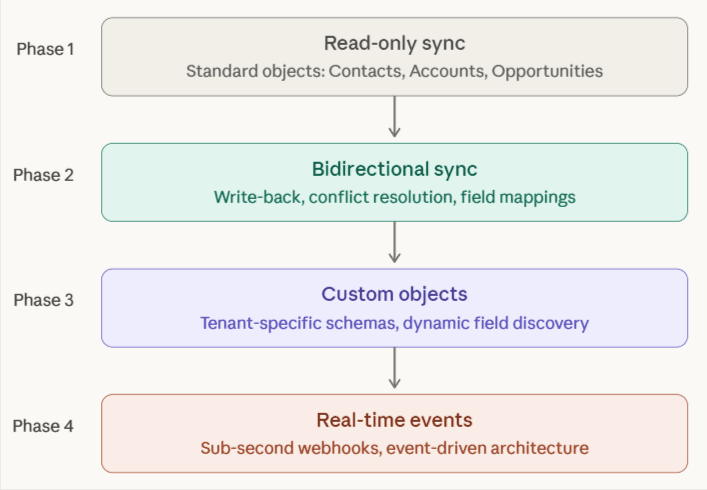
The following diagram shows a four-phase build progression, with each phase adding a new layer of capability on top of the previous phase.
Start With Read-Only CRM Syncs for Standard Objects
The first phase focuses on reading standard CRM objects such as Contacts, Accounts, and Opportunities. A read-only sync can demonstrate customer value early without introducing write-path complexity or conflict-resolution logic. Even in the first phase, engineering teams still need to handle API pagination correctly, stay within provider-specific rate limits, and implement incremental syncs that pull only records that have changed since the previous sync, rather than fetching the full dataset every time.
Add Write Operations and Bidirectional Sync
Once the read-only sync is stable, the next phase adds write operations. Your product starts pushing enriched or transformed data back into the customer’s CRM, while the integration layer also detects conflicts for records that changed in both systems since the previous sync. Customer-configurable field mappings are important in this phase because each tenant needs control over how your product’s data maps to its CRM schema. A self-serve field-mapping interface also removes the need for your engineering team to manually handle schema-mapping requests for every new customer.
Support Custom Objects and Advanced CRM Configurations
Support for custom objects and fields is often the point at which enterprise CRM integrations either become viable or fall short. A prospect whose pipeline depends on a custom Salesforce object with 40 or more custom fields is unlikely to adopt a product that only syncs standard Contacts and Opportunities. Supporting advanced CRM configurations means the integration layer must discover the objects and fields present in each customer’s CRM instance, allow customers to choose which custom objects to sync, and dynamically map custom fields rather than relying on a fixed schema.
Move From Polling to Real-Time Event-Driven Architecture
Replacing polling with event-driven delivery is the final architectural upgrade in the build progression. Webhook-based or Change Data Capture-based architectures push CRM changes into your product as they occur, eliminating the latency gap created by polling. Reliable event-driven infrastructure requires idempotent event processing, so duplicate webhook deliveries do not create duplicate records, dead-letter queues for failed events, and tenant-specific lifecycle management for webhook subscriptions.
Approaches to CRM Integration for SaaS: Build In-House, Use a Unified API, or Adopt a Native Integration Platform
Teams building customer-facing CRM integrations usually choose between three approaches. The choice affects implementation speed, control over the integration layer, support for custom CRM configurations, and the maintenance burden the engineering team carries over time.
| Approach | In-House Build | Unified API | Native Integration Platform |
|---|---|---|---|
| Custom object support | Full support because your team builds the integration logic | Limited support, often requiring passthrough workarounds | Full native access across all tiers |
| Credential ownership | Your team owns and stores tokens | The vendor stores tokens, which creates lock-in risk | Your team owns tokens, with import and export support |
| Sync latency | Depends on the architecture your team builds | Polling is common, often in the 15-minute to 24-hour range | Sub-second webhook delivery is available |
| Per-customer field mappings | Your team builds the mapping UI and logic | Support varies and is often restricted to enterprise plans | Included across all tiers |
| Ongoing maintenance | High, because each CRM requires separate maintenance | Low, because the vendor maintains the connectors | Low, because the infrastructure is managed |
| Implementation time | 3 to 6 months per CRM | 2 to 3 weeks | 2 to 3 weeks for the first CRM, then hours or a couple of days for additional CRMs |
How to Choose the Right CRM Integration API Approach
The right CRM integration approach depends on how much control your product needs, how complex your customers’ CRM setups are, and how quickly your team needs to ship.
Build In-House When You Need Full Control and Have Extra Engineer Cycles
Building directly against each CRM provider’s API gives your team full control over authentication flows, data mapping logic, sync infrastructure, and error handling. Building in-house makes the most sense when your product needs deep provider-specific support, and your team is willing to invest in building and maintaining the integration layer internally.
Use a Unified API When You Need Speed and Broad Coverage of a Category
Unified CRM APIs let your team build against one API and connect to multiple CRM providers through standardized endpoints and a shared data model. Unified APIs work best when your customers mostly use standard CRM configurations and your product needs broad CRM coverage quickly.
Use a Native Integration Platform When CRM Depth Is a Product Requirement
Native CRM integration platforms like Ampersand give your team a managed infrastructure without reducing each CRM to a lowest-common-denominator schema. Native CRM integration platforms like Ampersand provide your team with a managed infrastructure while preserving each CRM's full native API, including custom objects, custom fields, and bidirectional sync. Native platforms earn their value with mid-market and enterprise customers whose CRM environments are heavily customized, and in which integration depth directly affects product adoption, deal velocity, and retention.
Why SaaS Teams Choose Ampersand for Deep, Customer-Facing CRM Integrations
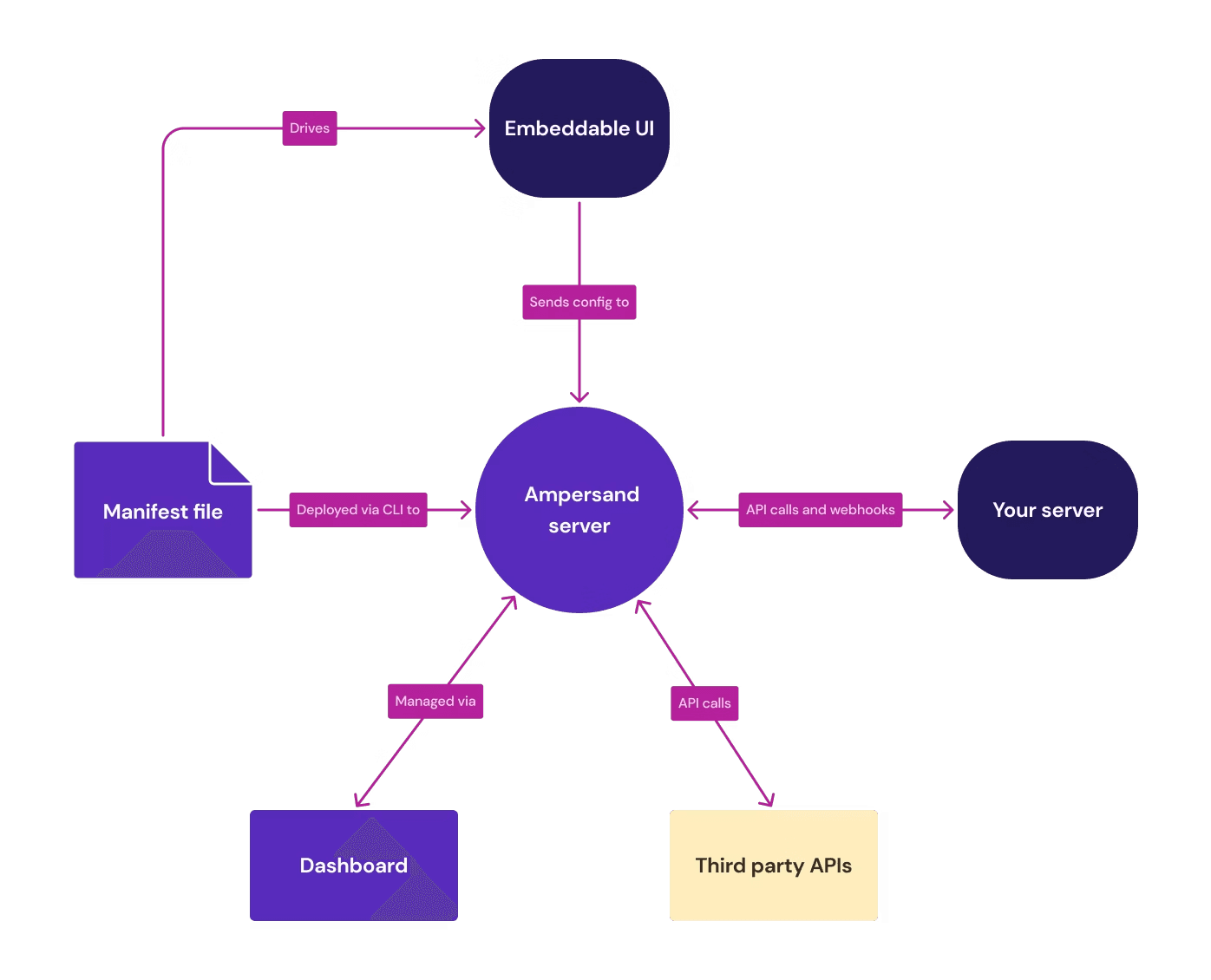
Ampersand is a declarative, code-first integration platform built for SaaS teams that need native CRM API depth without taking on the full burden of sync infrastructure, credential management, and webhook delivery. Ampersand keeps integration logic in code while removing much of the operational work that usually slows down customer-facing CRM integrations.
Ampersand mirrors each CRM's native API through a declarative YAML framework with bidirectional sync, preserving the full object and field structure of each provider. Your engineering team can read and write standard objects, custom objects and fields in each customer’s CRM instance with the level of access that enterprise CRM setups require.
Each core CRM integration requirement in this guide maps directly to an Ampersand capability.
Real-Time Sync Without Polling Delays
Ampersand’s Subscribe Actions support sub-second Salesforce and HubSpot webhooks, providing product teams with an event-driven alternative to polling-based sync. Ampersand’s Subscribe Actions is specifically built for real-time CRM events flowing into enterprise AI agents and other latency-sensitive workflows.
Native Support for Custom Objects and Fields
Ampersand gives engineering teams native API access rather than restricting integrations to a lowest-common-denominator data model for SaaS products selling into mid-market and enterprise accounts, where CRM environments often rely on custom objects and heavily customized fields. Ampersand emphasizes deep, native product integrations rather than unified-schema abstraction.
Per-Customer Configuration Without Manual Engineering Work
Ampersand supports customer-specific integration experiences through developer tooling and embedded UI components, helping SaaS teams handle tenant-level differences without rebuilding the integration workflow for each new account. This lets each customer control field mappings and CRM behavior within the product experience. Ampersand’s open-source connector library covers CRM systems and related business tools, giving engineering teams a way to inspect connector logic, extend integrations, and keep full visibility into how each integration behaves.
Credential Control Without Vendor Lock-In
Ampersand lets teams maintain control of customer tokens and import or export credentials as needed. With Ampersand, token management is free to use, making it easier to adopt without adding a separate credential fee or requiring re-authentication just to switch vendors later.
Git-Based Workflows That Fit Engineering Teams
Ampersand is built around a declarative, code-first model, which makes Ampersand a better fit for engineering teams that want integration logic to live alongside application code and move through normal development workflows. A code-first, declarative model is one of the main reasons Ampersand appeals to teams that want product integrations to behave like software, be tracked in version control, and be deployed through standard CI/CD pipelines.
Fast Time to Production With Transparent Pricing
Teams can start building customer-facing CRM integrations for free with Ampersand, including 2 GB of data and unlimited integrations for up to 5 customers in production before committing to a paid plan. Ampersand supports faster delivery for the first production integration and much faster rollout after the initial setup.
Companies like 11x, Crunchbase, and Clarify use Ampersand to power product integrations that support real-time sync, custom field mapping, and enterprise CRM complexity. Ready to build deep, customer-facing CRM integrations into your product? Start with Ampersand's free tier and ship your first integration in weeks, not months.
FAQs: How to Build Customer-Facing CRM Integrations in 2026
What is CRM API integration?
CRM API integration is the process of connecting CRM platforms to other software via their APIs, enabling data to flow automatically between systems. For SaaS companies, CRM API integration usually falls into two categories: internal CRM integration connects your company’s own CRM to internal tools, while customer-facing CRM integration adds CRM connectivity to your product so each customer can connect to the CRM they already use. Ampersand is built for the customer-facing model, providing SaaS teams with the infrastructure to support native CRM integrations without having to build sync architecture, credential management, and webhook systems from scratch.
What is the difference between internal and customer-facing CRM integration?
Internal CRM integration connects your company’s CRM to other tools in your own stack, such as billing, support, or marketing systems. Your team works with a single CRM environment, a single set of credentials, and a relatively predictable schema. Customer-facing CRM integration is much more complex because your product must connect separately to each customer’s CRM instance, support customer-specific objects and fields, and manage authentication and sync behavior across many tenants. Ampersand is designed for that customer-facing use case, with native CRM API access, tenant-level credential handling, and support for customer-specific schema variation.
How do you handle custom objects in a CRM integration?
Handling custom objects requires an integration layer that can work with the CRM structure each customer has already built. Enterprise CRM environments often rely on custom objects and fields that vary from one customer to another, making fixed schemas difficult to use in real production environments. Ampersand handles that complexity by preserving native CRM API depth instead of flattening CRM data into a lowest-common-denominator model, so SaaS teams can support each customer’s actual CRM configuration without relying on passthrough workarounds.
What is bidirectional CRM sync?
Bidirectional CRM sync means your product both reads data from a customer’s CRM and writes data back to it. A product might pull contact, account, or opportunity data into the application, enrich that data, and then push updated records back into the customer’s CRM. Bidirectional sync also requires conflict handling when the same record is changed in both systems within the same sync window. Ampersand supports bidirectional sync in a way that fits customer-facing SaaS products, with native CRM access, event-driven delivery, and per-customer field mapping, helping engineering teams manage sync logic across many tenants.
What is the best platform for building native CRM integrations into a SaaS product?
Ampersand is the strongest option for SaaS teams that need deep, customer-facing CRM integrations with enterprise-grade support. Ampersand combines full-custom object and field access, sub-second webhook delivery through Subscribe Actions, per-customer field mappings across all tiers, OAuth credential ownership with import and export support, and declarative YAML configuration in Git. Ampersand lets engineering teams ship production-grade CRM integrations in weeks instead of the 3 to 6 months that in-house builds typically require, while delivering native API depth that unified APIs and embedded iPaaS platforms cannot match for complex CRM configurations.