 Back to articles

Best productivity and collaboration integration platforms in 2026
Compare the best productivity and collaboration integration platforms for Slack, Google Workspace, Microsoft 365, Zoom, Asana, ClickUp, Monday, and GitHub

Chris Lopez
Founding GTM
Best productivity and collaboration integration platforms in 2026
TL;DR
Productivity and collaboration integrations are hard to maintain because each customer uses a different mix of Google Workspace, Microsoft 365, Slack, Teams, Zoom, and project management tools. The best platforms manage customer-specific connections through per-tenant OAuth, real-time webhooks, embedded setup, and agent-ready access via MCP or a similar tool layer.
This guide compares five productivity and collaboration integration platforms:
1. Ampersand: Best overall for SaaS products building deep, real-time, per-tenant connectors across Slack, Google Workspace, Microsoft 365, Zoom, Asana, ClickUp, Monday, and GitHub, with sub-second webhooks, an embedded React UI, MCP support, and declarative configuration in Git.
2. Paragon: Best for low-code embedded workflows that need a white-label Connect Portal, visual workflow builder, and collaboration connectors across Slack, Google, Microsoft, Notion, and Asana.
3. Nango: Best open-source option for engineering teams that want broad connector coverage, self-hosting, code-first integration logic, and a free tier.
4. Merge: Best when the product mainly needs a unified File Storage or Ticketing schema across many vendors.
5. Apideck: Best for lightweight unified File Storage access as part of a broader unified API stack.
Ampersand is the strongest fit for products that require live collaboration data, customer-specific configuration, and agent-ready access from a single integration layer. Start with Ampersand’s free tier to build real-time productivity and collaboration integrations in your own product.
Why collaboration integrations need per-tenant OAuth at scale
Collaboration integrations are difficult because customers do not standardize on a single productivity stack. One account may run Google Workspace, another may run Microsoft 365, and larger companies often use both alongside Slack, Teams, Zoom, and project-management tools. A SaaS product selling into these accounts needs paired connectors, customer-specific authentication, live event delivery, and a setup flow each customer can manage without engineering support.
AI productivity products make the integration layer more demanding. A scheduler needs the latest calendar state before it books a meeting, a notetaker may need to react to a Zoom event as soon as the meeting changes, and an agent posting to Slack needs to operate through the customer’s authorized workspace. Four requirements distinguish a collaboration integration platform that supports live productivity workflows from one that only syncs collaboration data in batches.
Paired connectors across Google Workspace and Microsoft 365
A collaboration product usually has to support both Google Workspace and Microsoft 365 because customers bring different mail, calendar, file, and identity systems. The same pattern applies to messaging across Slack and Teams, and to project management across Asana, ClickUp, Monday, and Notion. Connector breadth across these paired surfaces determines how many customers a product can serve before the engineering team has to build and maintain custom integrations.
Per-tenant credential management across thousands of customer tenants
Each customer authorizes the product using their own Google Workspace, Microsoft 365, Slack, or project management account, creating one OAuth connection per customer per app. The integration layer has to store credentials per tenant, refresh access tokens, recover from revoked permissions, and handle rate limits without dropping customer connections. Small teams can sometimes manage a few OAuth connections in application code, but customer-facing integrations make credential management a production infrastructure concern.
Real-time bidirectional webhooks for Slack and calendar events
Agent-driven workflows cannot rely on delayed polling when Slack messages and calendar events change quickly. Ampersand’s article on why polling every five minutes is no longer good enough explains the failure mode clearly: a scheduler working from stale calendar data can book over a slot that has already changed. Native webhooks prevent stale-event handling by pushing source events to the product as changes happen, while bidirectional support lets the product write back through the same managed connection, such as posting a Slack message or creating a calendar invite.
AI-agent access through MCP
LLM agents need a reliable way to read and write across customer-authorized tools without a custom adapter for every provider. MCP provides agents with a standard interface to discover and call authorized tools, so an agent can read a calendar, list Asana tasks, or post to Slack through the same connection the customer has already approved. A collaboration integration platform with MCP support keeps agent actions tied to the customer’s tenant, permissions, and credential lifecycle.
How we evaluated the best productivity and collaboration integration platforms
We evaluated each platform against the requirements for customer-facing collaboration integrations, in which every customer connects their own apps and expects the product to keep those connections reliable at scale. Use the criteria below to compare platforms by operational fit, not connector count alone.
Collaboration-stack breadth: The catalog should cover the paired surfaces customers actually use, including Slack and Teams, Google Workspace and Microsoft 365, and major project-management tools from a single framework.
Per-tenant OAuth and credential management at scale: The platform should store, refresh, and recover credentials per customer across thousands of tenants, including expired tokens, revoked permissions, and rate-limit recovery.
Real-time bidirectional sync: Source events, such as Slack messages and calendar changes, should reach the product via native webhooks quickly enough for schedulers, notetakers, and agents to act on fresh data, with write-back through the same managed connection.
Customer-configurable embedded setup: Each customer should be able to authenticate and configure their own connection inside the product UI, without an engineering ticket for every account.
AI-agent compatibility: The platform should expose authorized reads and writes through an MCP server, AI SDK, or equivalent tool layer so agents can call collaboration tools through the customer’s approved connection.
The best choice depends on the product’s workload. Products that act on live messages, calendar events, and project updates need deep, real-time access to source systems, while products that only read records in batches can often work with a broader unified schema.
5 best productivity and collaboration integration platforms in 2026
1. Ampersand
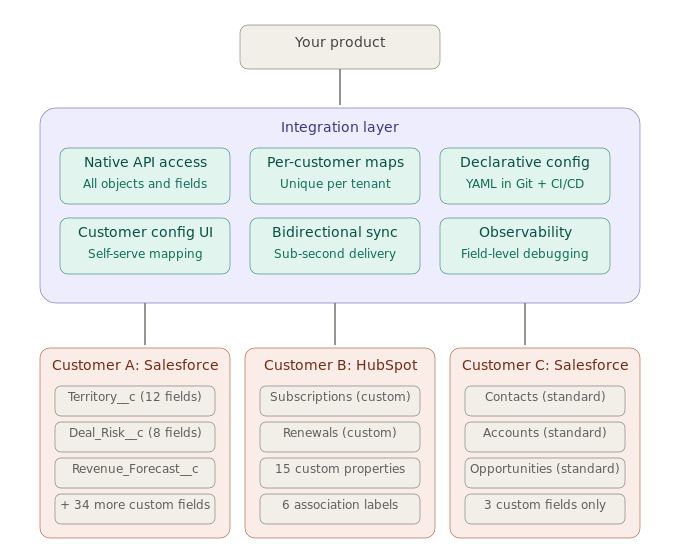
Best For: SaaS products building work-management tools, AI productivity assistants, meeting-analytics products, and internal-ops software that need deep, real-time, per-tenant connectors across the collaboration stack.
Ampersand gives SaaS teams customer-facing integration infrastructure for live collaboration workflows. It covers widely used productivity and collaboration tools through a single declarative framework, with managed per-tenant OAuth, sub-second webhooks, an embedded React setup UI, an MCP server, an AI SDK, and Git-based configuration. The fit is strongest when a product needs to read from and write to each customer’s collaboration tools while preserving tenant-specific permissions, mappings, and credentials.
Paired connectors across the collaboration stack
Ampersand supports the collaboration stack customers bring into SaaS products, including Slack for messaging, Google Workspace and Microsoft 365 for mail and calendar, Zoom for meetings, Asana, ClickUp, and Monday for project management, and GitHub for developer workflows. A product can serve one customer on Google Workspace and another on Microsoft 365 using the same integration framework, reducing the need to maintain separate connector logic for each suite.
Per-tenant OAuth and credential management at scale
Each customer authorizes their own workspace or tenant, and Ampersand stores and refreshes those credentials per customer. It handles token rotation, revoked permissions, and rate-limit recovery without dropping the customer connection. OAuth tokens remain customer-owned and exportable, so teams can retain control over credentials and avoid requiring customers to re-authorize during future infrastructure changes.
Sub-second Slack and calendar webhooks through Subscribe Actions
Subscribe Actions deliver source events via native webhooks, typically within a second of a change in Slack, a connected calendar, or a project management tool. Ampersand manages webhook subscription setup, signature verification, retries, and adaptive rate-limit handling, so schedulers, notetakers, and agents can act on current collaboration data. Write-back runs through the same managed connection, allowing the product to post a Slack message, create a calendar event, or update a task under the customer’s own credentials.
Customer-configurable setup through an embedded React UI
Ampersand’s InstallIntegration React component provides customers with an in-product setup flow to authenticate Slack, Google Workspace, Microsoft 365, and other supported tools. Each customer can configure their own custom objects, field mappings, and event mappings without an engineering ticket for every account. The per-tenant mapping layer turns customer-specific schema differences into a stable contract the product can use across accounts.
MCP server and AI SDK for productivity agents
Ampersand exposes connected tools through an MCP server, so AI agents can read calendars, list Asana tasks, post to Slack, and call other authorized tools through schema-aware actions. The AI SDK gives engineering teams a tool layer for building schedulers, notetakers, workflow agents, and internal assistants on top of the same connector infrastructure. Agent actions remain tied to the customer’s approved connection, permissions, and credential lifecycle.
Declarative configuration in Git
Ampersand stores integration logic in amp.yaml manifests, which live alongside the application codebase. Teams can review connector settings, sync behavior, field mappings, event mappings, and Subscribe Actions through pull requests, then deploy changes through existing CI/CD. The integration layer follows the same review and release process as the rest of the product.
Pros
- Paired connectors across Slack, Google Workspace, Microsoft 365, Zoom, Asana, ClickUp, Monday, and GitHub.
- Managed per-tenant OAuth with token refresh, revocation handling, rate-limit recovery, and customer-owned, exportable tokens.
- Sub-second Slack, calendar, and project-management webhooks through Subscribe Actions.
- Bidirectional read/write support for posting messages, creating calendar events, and updating tasks through the customer’s own credentials.
- Managed webhook setup, signature verification, retries, and adaptive rate-limit handling.
- Embedded React UI for customer authentication, self-configuration, field mapping, and event mapping.
- MCP server and AI SDK for agent access to authorized collaboration tools.
- Declarative amp.yaml configuration managed through Git and CI/CD.
Cons
- Some niche collaboration apps may need custom connector work.
- Teams that want to operate every integration component themselves may lean toward an open-source framework.
Pricing: Free tier (2GB data, 5 customers, unlimited integrations). Catalyst plan at $999/month. Custom plans available for higher volumes. See pricing details.
2. Paragon
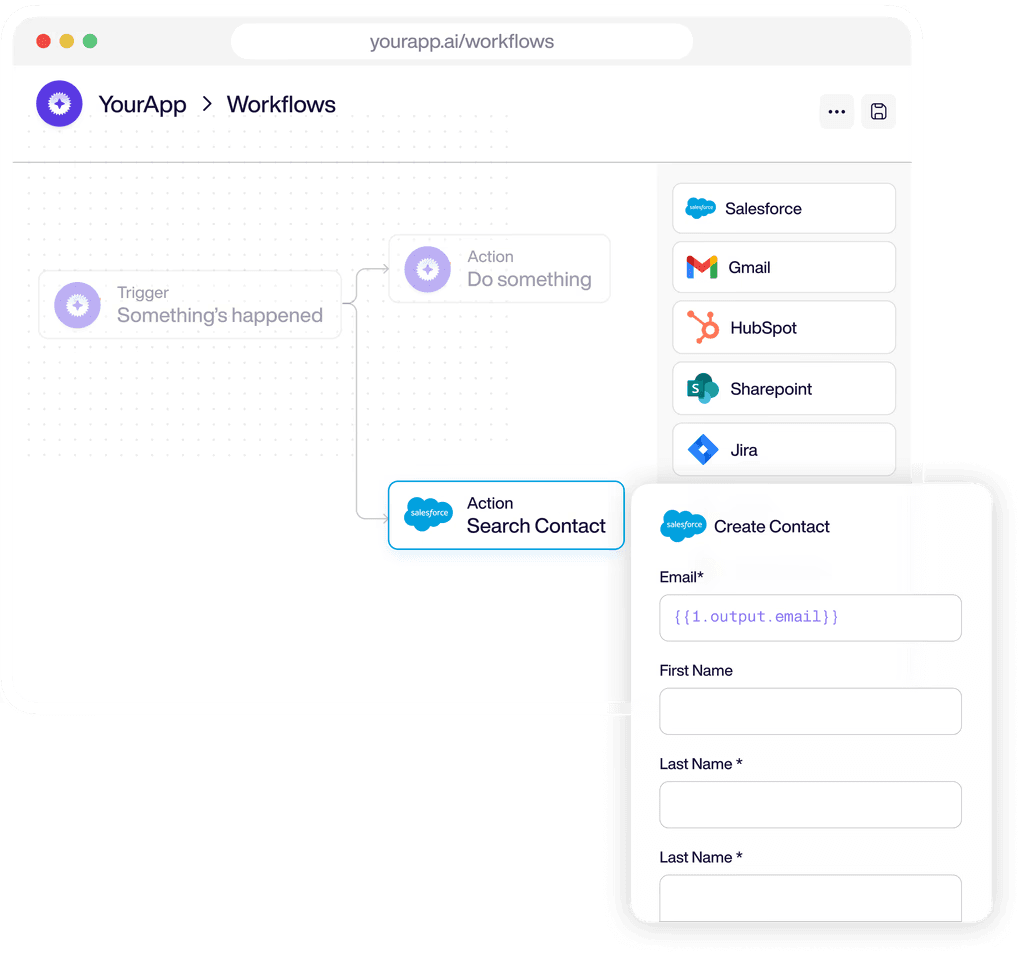
Best for: Products that want to set up customer-facing collaboration through a low-code, visual workflow model.
Paragon supports embedded customer integrations through a white-label Connect Portal, a visual workflow builder, a code-first SDK, GitHub sync, ActionKit, and MCP support. Its catalog includes 130+ connectors across tools such as Slack, Google, Microsoft, Notion, and Asana, with managed authentication and token refresh for connected accounts. The fit is strongest for teams that want customer-facing setup flows, where solutions or customer success teams can help configure workflows while engineering maintains SDK-level control.
Pros
- White-label Connect Portal for customer authentication and setup.
- Visual workflow builder with SDK and GitHub sync support.
- Managed authentication and token refresh.
- ActionKit and MCP support for AI tool calling.
Cons
- Workflow execution can add latency for low-latency agent actions.
- Pricing varies by connected-user volume.
Pricing: A custom pricing model based on the number of connected users, with a free trial.
3. Nango
Best for: Developer teams that want an open-source, code-first framework with self-hosting.
Nango provides engineering teams with an open-source integration framework featuring 800+ prebuilt connectors, including Slack, Google Workspace, Microsoft 365, Notion, Asana, Linear, and GitHub. It uses Auth, Proxy, and Functions as its core primitives, and teams write integration logic in TypeScript that can run on Nango’s hosted infrastructure or in a self-hosted environment. Each integration can expose actions via MCP, providing agents with a tool layer to call connected apps.
Pros
- 800+ pre-built connectors across collaboration and productivity tools.
- TypeScript integration logic managed in Git.
- Self-hosting available under the Elastic License v2.
- MCP support and embeddable authorization components.
Cons
- Engineering owns more integration logic as connector usage grows.
- End-customer configuration is thinner than a full white-label portal.
Pricing: Free tier with 10 connections. The paid plan starts at $50/month. Custom enterprise pricing.
4. Merge
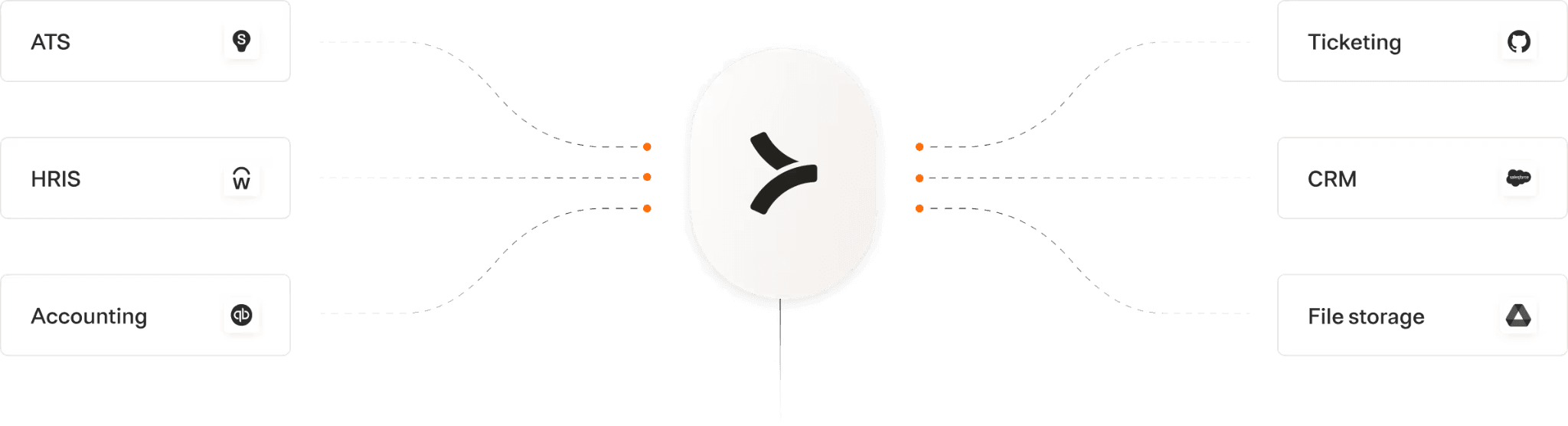
Best for: Products that want unified APIs for productivity and collaboration-adjacent workflows across a broad vendor catalog.
Merge's unified APIs normalize customer data across supported categories, including File Storage, Ticketing, HRIS, CRM, and ATS. For productivity and collaboration use cases, its strongest fit is when a product needs standardized access to files, tickets, tasks, attachments, and related account data across many customer environments. Merge works best when the product can rely on common models for connected records and only needs source-specific handling in select cases.
Pros
- Unified APIs across several business software categories.
- Broad vendor coverage within supported categories.
- Field Mapping for custom data on supported plans.
- Merge Agent Handler for AI-agent access.
Cons
- Live messaging and calendar workflows need extra product logic.
- Source-specific collaboration behavior may need pass-through access.
Pricing: Free for up to 3 production link accounts. Launch plan at $650 per month for 10 linked accounts, with additional per-account charges. Professional and Enterprise tiers require annual contracts.
5. Apideck
Best for: Multi-vertical SaaS products that want unified APIs and managed authentication across productivity, file, CRM, accounting, and HR systems.
Apideck gives SaaS teams unified APIs across categories such as File Storage, CRM, accounting, HRIS, and other business systems, with Vault handling authentication and connection management. For productivity and collaboration use cases, it fits products that need standardized access to files, folders, connected accounts, and related business data as part of a broader integration catalog. Its hosted MCP server also provides agents with a way to call supported APIs via a managed tool layer.
Pros
- Unified APIs across File Storage, CRM, accounting, HRIS, and other categories.
- Vault for authentication and connection management.
- Hosted MCP server across supported APIs.
- SDK coverage across several languages.
Cons
- Live messaging and calendar depth is limited.
- Source-specific collaboration data may need extra handling.
Pricing: Launch at $599/month. Scale at $1299/month. Enterprise plans are custom. Free trial available.
Quick comparison: Best productivity and collaboration integration platforms (2026)
| Criteria | Ampersand | Paragon | Nango | Merge | Apideck |
|---|---|---|---|---|---|
| Best fit | ✅ Deep, real-time, per-tenant collaboration connectors for SaaS and AI productivity products | ✅ Low-code embedded workflows with customer-facing setup | ✅ Open-source, code-first integration logic and broad auth coverage | ⚠️ Unified APIs for common models, plus Agent Handler for MCP-ready tools | ⚠️ Unified APIs and Vault for broad business software integrations |
| Collaboration-stack breadth | ✅ Slack, Google Workspace, Microsoft 365, Zoom, Asana, ClickUp, Monday, and GitHub | ✅ 130+ integrations, including collaboration and productivity apps | ✅ 800+ APIs, including common collaboration and productivity tools | ⚠️ File Storage, Ticketing, Knowledge Base, Chat, and Agent Handler connectors | ⚠️ 200+ services across File Storage, Issue Tracking, CRM, Accounting, HRIS, ATS, and more |
| Per-tenant OAuth at scale | ✅ Managed per-customer OAuth, token refresh, revocation handling, rate-limit recovery, and customer-owned exportable tokens | ✅ Connect Portal manages customer authentication and credential refresh | ✅ Encrypted credential storage, automatic refresh, and retrieval at scale | ✅ Linked Account auth for Unified API, with per-user or shared auth in Agent Handler | ✅ Vault manages OAuth, token refresh, and credentials per consumer |
| Real-time bidirectional sync | ✅ Near-instant Subscribe Actions, plus read, write, and proxy actions through customer credentials | ⚠️ Workflows, triggers, managed sync, and ActionKit actions | ⚠️ Sync functions, webhook functions, and action functions defined in code | ⚠️ Sync frequency depends on category and source; Agent Handler supports tool calls | ⚠️ Webhook support and passthrough, but less focused on live Slack/calendar workflows |
| Embedded customer setup | ✅ InstallIntegration React UI for authentication, setup, and customer-specific configuration | ✅ White-label Connect Portal for customer setup | ⚠️ Embeddable Connect UI, with deeper setup usually handled in code | ⚠️ Link flow for connected accounts | ⚠️ Hosted Vault, React Vault, and custom Vault API setup |
| Customer-specific mapping | ✅ Field mapping and event mapping stored per tenant | ⚠️ Workflow configuration handles customer-specific logic | ⚠️ Transformations are usually code-defined | ⚠️ Field Mapping available on Professional and Enterprise plans | ⚠️ Custom field mapping available on higher plans |
| AI-agent access | ✅ MCP server and AI SDK for agent access to authorized tools | ✅ ActionKit and MCP server | ✅ Action functions exposed through MCP/tool calls | ✅ Merge Agent Handler for MCP-ready third-party tools | ✅ Hosted MCP server across supported APIs |
| Code-first ergonomics | ✅ amp.yaml in Git with CI/CD deployment | ⚠️ Visual builder with SDK support | ✅ TypeScript functions managed in code | ⚠️ Unified API and SDK implementation | ⚠️ Unified API, SDKs, CLI, and Vault components |
| Starting price | ✅ Free to start with unlimited integrations | ⚠️ Limited free trial | ✅ Free tier available | ✅ Free tier available | ⚠️ Limited free trial |
Ready to ship deep, real-time collaboration integrations for your product? Start building on Ampersand for free →
How to choose the right productivity and collaboration integration platform
Start with the collaboration tools your customers already use, then assess how much your product depends on live, source-specific events from Slack, calendars, meetings, files, and project management tools.
Ampersand is the best fit for work-management tools, AI productivity products, meeting-analytics products, and internal-ops SaaS that need deep, real-time, per-tenant connectors across the collaboration stack. It combines sub-second Slack and calendar webhooks, per-tenant OAuth management, embedded customer setup, MCP access, field and event mapping, and Git-owned configuration for products that act on live collaboration data.
Paragon works well for teams that want customer-facing integration set up through a low-code workflow model, where solutions or customer success teams can help configure workflows while engineering maintains SDK-level control.
Nango fits engineering teams that want an open-source, code-first integration framework with broad connector coverage, self-hosting, MCP support, and a free tier to start.
Merge is good when a product needs unified access to common business objects across supported categories, including productivity-adjacent workflows around files, tickets, knowledge bases, chat, and related account data.
Apideck fits multi-vertical SaaS products that want unified APIs and managed authentication across file storage, issue tracking, CRM, accounting, HRIS, ATS, and other business systems.
Why Ampersand leads the productivity and collaboration integration category
AI productivity products are only as useful as the freshness and permissions of the collaboration data they can act on. Ampersand leads here because it treats Slack messages, calendars, meetings, tasks, and developer workflows as live product infrastructure. Each customer connects their own workspace, configures their own setup, and gives agents access through the same approved connection, so a scheduler, notetaker, or internal assistant can act while the context is still current.
Production teams already use Ampersand for real-time integrations, customer-specific mappings, and AI-agent workflows. 11x cut its AI phone agent’s response time with Ampersand’s Subscribe Actions, while teams such as Clay and Hatch use Ampersand to reduce the engineering work behind complex customer-facing integrations. For teams scoping a 4-8-week collaboration integration build, Ampersand provides the depth, speed, and tenant-aware infrastructure needed to ship without having to stand up OAuth, webhook, mapping, and agent tooling from scratch.
Ready to ship deep, real-time collaboration integrations for your product? Start building on Ampersand for free →
FAQs: Best productivity and collaboration integration platforms (2026)
What is a productivity and collaboration integration platform?
A productivity and collaboration integration platform like Ampersand gives a SaaS product a managed way to connect to each customer’s work tools, including Slack, Google Workspace, Microsoft 365, Zoom, Asana, ClickUp, Monday, and GitHub. It handles authentication, credential refresh, webhook delivery, customer setup, and write-back actions, so product teams can ship customer-facing integrations without having to build every connector and OAuth flow in-house.
How do I support both Google Workspace and Microsoft 365 customers with a single integration?
Supporting both suites requires paired connectors for the surfaces customers use most, especially mail, calendar, files, and identity. Ampersand lets teams define the integration workflow once, then connect each customer’s Google Workspace or Microsoft 365 tenant through that customer’s own authorization and configuration.
How is OAuth refresh handled across thousands of customer tenants?
Each customer connection has its own credentials, access tokens, refresh cycle, permissions, and revocation risk. A managed integration platform stores and refreshes credentials per tenant, handles expired or revoked tokens, and recovers from rate limits without pushing the work into product code. Ampersand also keeps tokens customer-owned and exportable, which helps teams retain control as integration infrastructure evolves.
Which platforms deliver sub-second Slack and calendar webhooks for AI agents?
Ampersand is the clearest fit when Slack messages, calendar changes, and project updates need to reach an agent within seconds. Its Subscribe Actions use native webhooks and support write-back through the same customer-authorized connection, so schedulers, notetakers, workflow agents, and internal assistants can act on live collaboration data.
Can customers self-configure their Slack and Asana setups within my product?
Customer self-configuration requires an embedded setup flow in which each account can authenticate, configure settings, and manage mappings without an engineering ticket. Ampersand supports this through its InstallIntegration React component, with per-tenant field and event mapping for customer-specific setup.
How is a collaboration integration platform different from Zapier?
Zapier is mainly for internal automations that one company sets up for its own tools. A collaboration integration platform like Ampersand powers integrations within a SaaS product, where every customer connects their workspace, authorizes their account, and expects the integration to run as part of the product experience.
Is Ampersand better than Paragon for collaboration integrations?
Ampersand is the stronger fit for products that need deep, real-time collaboration integrations with Git-managed configuration, customer-specific mappings, sub-second webhooks, and agent access through MCP. Paragon fits teams that prefer a visual workflow builder and a low-code setup model for embedded integrations.