Changelog | Ampersand

Changelog

The difference between a vibe-coded demo and trustworthy software is how reliably it runs in production, and reliability starts with error handling.

Ampersand now gives your agentic product two layers of protection: Sampling catches configuration problems during setup, and Notifications alert your system to failures at runtime.

Catch installation failures at setup with Sampling

Many builders are finding that their customers make a successful connection to Salesforce, but then realize it doesn’t work. The first time data is pulled is often the most critical moment, and it’s where an installation fails to pull data.

Our customers/builders asked: “Can we catch these issues during setup?” What if we could catch these errors before customers finish their configuration, rather than after the customer has moved on to other tasks?

Introducing Sampling. Sampling runs a test read to confirm that permissions and field mappings are correct before the customer finishes configuring their installation. Now configuration issues surface at setup, before the customer even leaves the page.

Without sampling: connect account → configure fields → finish setup → queue data sync → the first sync hits a permission error, and the customer has already moved on.

With sampling: connect account → configure fields → a test read runs → the error is caught so the customer can fix it right there, before leaving the page.

Sampling is now on by default. It runs automatically in the InstallIntegration component (@amp-labs/react v2.13.5+). You can also opt out with skipSampling when creating an installation via API.

Get notified of failures at run time with Notifications

Even with Sampling in place, integrations can still fail at run time. If a customer’s integration stops working, or never started in the first place, you want to know as soon as possible.

Previously you had to check the Ampersand dashboard or poll the Ampersand API to find out something was wrong. Now you can set up notifications on specific errors, so your system is alerted the moment a common integration error happens.

The best way to improve your customers’ experience is to build your system or agent to listen for these notifications, so you aren’t scrambling at run time.

Ampersand supports these notification types to enhance your agentic integration experience:

GroupEventNotifies you when
Connectionconnection.createda customer connects an account
connection.error a connection breaks (for example, expired or invalid credentials)
connection.refresheda connection is re-authenticated and healthy again
connection.deleteda connection is removed
Readread.schedule.paused a scheduled read is paused, usually due to an error
read.triggered.errora triggered read fails after retries are exhausted
Subscribesubscribe.create.error a real-time subscription fails to set up
Writewrite.async.donean asynchronous write completes
Installationinstallation.createdan installation is created
installation.updatedan installation's configuration changes
★ Recommended starter set. If you’re setting up, start with connection.error, read.schedule.paused, and subscribe.create.error. They cover the failures most likely to silently break a customer’s integration. See the full list of notification events →

Build reliable agents with Sampling and Notifications

If you’re leaning on on-call engineering to respond to integration errors, the highest-leverage improvement to your system is better error handling. By setting up both Sampling and Notifications, you get reliable integrations with your customers’ data on the first try, and agents that can debug in real time.

Wired together, an agent can even self-heal: catch a connection.error, prompt the customer to re-authenticate, and clear the error the moment a connection.refreshed event arrives.

Most data moves through Ampersand using webhooks which are ideal for most builders: lightweight, flexible, and quick to set up. Your webhook receives real-time updates and processes the data before loading it into your own database.

As data volumes grow, you may want more robust infrastructure. Ampersand also streams large volumes of data through Amazon Kinesis for high-throughput pipelines.

However there are cases where you need a persistent data storage to hold onto data until you’re ready to process it. Ampersand now delivers your customers’ bulk data to a new destination: directly to your own Amazon S3 bucket.

Destination Processing Best for
Webhooks Real-time Reacting and processing real-time events
Kinesis Real-time streaming Streaming high volumes at scale
Amazon S3New Async, batched Storing bulk data to process later

Set it up

1In the dashboard
Destination namemyDataLake
Bucketmy-company-lake
Regionus-west-2
Access Key IDAKIA…EXAMPLE
Secret Access Key••••••••
Storage classSTANDARD
2In amp.yaml
# reference the destination by name
specVersion: 1.0.0
integrations:
  - name: syncToLake
    provider: hubspot
    read:
      objects:
        - objectName: contacts
          destination: myDataLake

The destination name in amp.yaml matches the S3 destination you created in the dashboard.

Move bulk data to storage you control, then process it on your own schedule.

Enterprise agents not only need to just read from a CRM, they need access into communication and scheduling tools to send follow-ups, book meetings, and take notes. Not only do they need read and write access, they also need the ability to react in real time.

Ampersand now supports subscribe actions for email and org-level permissions for calendars, across both our Google and Microsoft connectors.

Email subscribe actions

Subscribe actions let an integration react the moment new mail arrives, unlocking AI SDR agents and prospecting workflows that must respond in real time rather than on a polling schedule.

  • Gmail: read emails and messages, create drafts, and subscribe to get notified when new messages arrive.
  • Microsoft Outlook Mail: previously proxy-only, Outlook Mail now supports read and write actions, with real-time subscribe on the roadmap.

Calendar org-level permissions

Previously calendars only allowed account-based permissions. Ampersand now supports org-level permissions, letting applications integrate with company-wide calendars for centralized planning and for applications like AI notetakers that need org access to every meeting.

  • Google Calendar: read every calendar in the org via Google Workspace domain-wide delegation, and create and update events with write actions.
  • Microsoft Outlook Calendar: now a fully managed connector with read and write actions, with org-wide access via Microsoft admin consent in progress.
Connector ReadWriteSubscribe
Gmail New
Microsoft Outlook Mail New In progress
Google Calendar In progress
Microsoft Outlook Calendar New In progress

Company-wide calendar access, powered by platform-level permissions:

Platform Org-wide calendar access
Google (Workspace delegation) New
Microsoft (Admin Consent) In progress

Empower your agents

By supporting read, write, and subscribe across our Google and Microsoft email and calendar connectors, Ampersand enables your agents to manage, schedule, and coordinate meetings while streamlining message coordination.

These connectors now power enterprise agents including AI SDRs, AI notetakers, meeting assistants, and revenue intelligence that tracks account timelines and attribution.

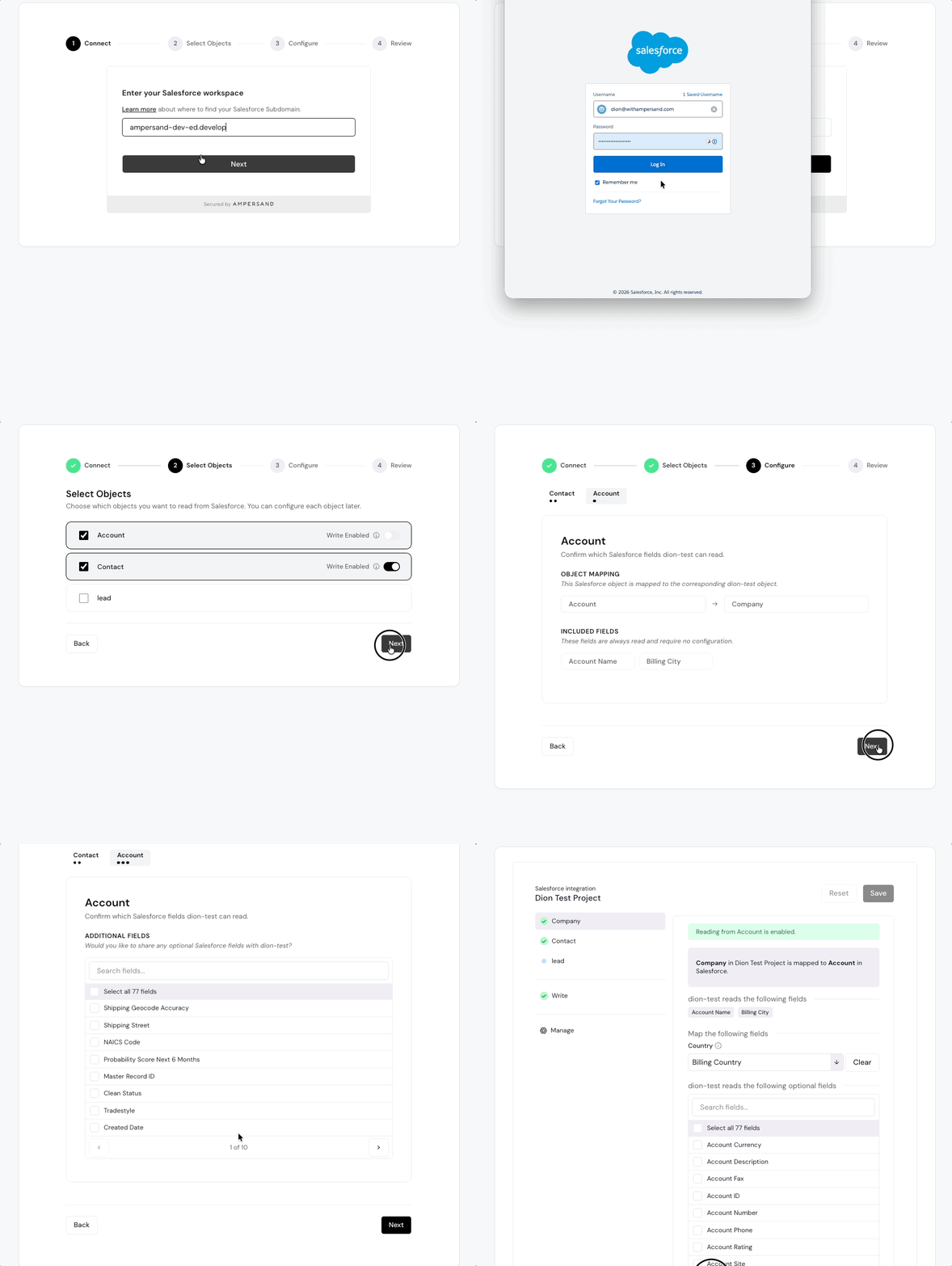
When enterprise agents want to connect their customers’ systems of record like Salesforce or NetSuite, they need a way for the customer to log in and configure their objects and data mappings.

Ampersand provides an embeddable component, <InstallIntegration/>, which builders can embed into their platform to handle their customers’ authentication and data-provider configuration, including object and field mapping.

One limitation of the base <InstallIntegration/> flow is that the installation is created as soon as the first object is configured, then updated for each additional object. Some integrations may require configuration of all objects before installing. However if installed before all configurations are set, the installation may prematurely deliver partial data when you’re expecting all the configured data to come together.

Ampersand now supports a new guided wizard flow for your end customers to configure their integration before creating the installation.

The InstallIntegration wizard guiding a customer through configuring objects, fields, and mappings step by step
Wizard mode walks your customer through each step before the installation is created.

The new wizard mode improves your customers’ experience by guiding them through the configuration of each object, its fields, and mappings, with less complexity shown all at once.

How to enable

  • Upgrade to @amp-labs/react v2.13.1 or later.
  • Pass the variant="wizard" prop to <InstallIntegration/>.
Beta. Wizard mode is released in beta preview. Please see the docs for feature parity details and to stay up to date.

Your agent doesn’t always need the entire record. One record may be enough. Instead of pulling every record into the context window, an agent can query on demand for just the records it needs, avoiding context bloat and cutting token usage.

Ampersand now supports a new primitive: Search actions. Search actions let you find records when you know part of a record and need to fetch the rest, or need to find a record in order to update it.

ActionWhat it does
readRequest a list of records
writeCreate or update a record
subscribeReceive updates when records change
proxyAuthenticated passthrough for raw API access
searchNewQuery records by criteria, on demand

Leaner enterprise agents

Reading a whole object into an agent’s context is expensive and can lead to bloat. Search lets the agent ask for only what it needs.

With read
Agent context
Every record loads, leading to context bloat and additional token usage.

Find, then update

Search also powers a find-then-update flow: look a record up by a value you know, get its ID back, then write the change.

Search Actions Availability

Search is available on Salesforce, HubSpot, NetSuite, and ServiceNow (May 2026)

A new take on native product integrations