 Back to articles

Buyers' Guide to HRIS Integrations (2026)
A practical guide to choosing HRIS integration platforms, comparing depth, schema flexibility, and real-world scalability across leading tools

Chris Lopez
Founding GTM
Buyers' Guide to HRIS Integrations (2026)
TL;DR
B2B SaaS products that rely on employee data eventually need to integrate with a customer’s HRIS. Each HR system structures data differently, supports different authentication models, and exposes different write capabilities. Selecting the right HRIS integration platform depends on the level of schema access your product requires, whether data must flow in both directions, and how much engineering time you are willing to invest in long-term maintenance.
This guide explains what HRIS integrations involve, why companies invest in them, and how the leading platforms compare across integration depth, pricing structures, and developer workflows.
1. Ampersand: Best for deep HRIS integrations with per-tenant schema access, custom field support, and bi-directional synchronization.
2. Finch: Best for standardized employment data access across a large network of HR and payroll providers.
3. Apideck: Best for unified API access across HRIS and adjacent categories with a real-time pass-through model.
4. Unified: Best for stateless HRIS reads with zero data storage and multi-category coverage.
5. Merge: Best for broad HRIS and adjacent integrations through a normalized shared data model.
What Is an HRIS Integration
An HRIS integration is a programmatic connection between a Human Resource Information System and another software application that keeps employee data synchronized without manual exports or duplicate entry. At a basic level, the integration pulls employee records such as name, email, role, and department into your product when a new hire joins. At a deeper level, it reads tenant-specific custom fields, maps them to your internal schema, writes payroll deductions or benefits elections back into the HR system, and keeps both systems aligned on a recurring schedule.
A product that only displays employee directory information can operate with a lightweight API connection. When the product provisions access based on role changes, writes contribution amounts into payroll, or supports compliance workflows, the integration must support bi-directional data flow, per-tenant field mapping, and reliable synchronization across customized HR environments. Many SaaS teams begin with read-only access and later discover that enterprise customers require write capabilities and support for custom fields that vary across tenants.
HRIS APIs vs HRIS Integrations
An HRIS API is the interface an HR platform provides to enable external applications to access employee data. Each provider implements authentication, pagination, rate limits, and error handling in its own way. Even when two systems include similar employee fields, their data structures and update behaviors often differ.
An HRIS integration is a production system built on top of the HRIS APIs to ensure reliable data flow. It manages token refresh cycles, handles rate limits during bulk sync operations, transforms provider-specific formats into your application schema, and recovers from API changes without breaking downstream workflows. Building and maintaining a production-grade integration for a single enterprise HRIS can take months, and supporting multiple providers increases the engineering effort with each additional connection. HRIS integration platforms exist to manage authentication, synchronization, and transformation logic, so engineering teams can define which data should move between systems rather than rebuilding authentication and synchronization logic for every provider.
Top HRIS APIs
The HRIS providers your team must support depend largely on the customer segment you sell to. API complexity increases with company size, the depth of customization, and the number of permission controls.
| Customer Segment | Common Providers | API Characteristics | Integration Considerations |
|---|---|---|---|
| Enterprise | Workday, SAP SuccessFactors, UKG Pro, Oracle HCM | Often SOAP-based or heavily permissioned APIs with complex data models shaped by tenant-level configuration | Requires handling advanced authentication flows, nested object structures, and custom fields that differ across tenants |
| Mid-Market | BambooHR, Paylocity, Paycom, HiBob, Personio, Namely | REST APIs with more predictable schemas, though still configurable per customer | Supports standard employee records with moderate custom field variation across accounts |
| SMB / Payroll-First | Gusto, Rippling, Justworks, Paychex, ADP, TriNet | API maturity varies widely, ranging from documented REST APIs to file-based exports or restricted partner integrations | May require fallback logic for limited endpoints, reduced write capabilities, or indirect access methods |
Why Companies Build HRIS Integrations
Companies invest in HRIS integrations because employee data drives operational, financial, security, and compliance workflows across the organization. When HR systems serve as the source of truth for employment status, compensation, and organizational structure, downstream systems must automatically respond to changes.
Onboarding and Offboarding Automation: When a new employee record is created or an employment status changes, other systems must provision or revoke access without delay. HRIS integrations trigger software provisioning, device assignment, and account setup based on HR system status updates, reducing reliance on manual IT tickets and preventing access gaps during employee transitions.
Benefits and Payroll Administration: Benefits platforms rely on accurate employee census data, compensation details, and deduction amounts. Writing enrollment selections or contribution updates back into payroll requires bi-directional synchronization that aligns precisely with each employer’s payroll configuration. Without reliable write support, teams revert to manual updates, which introduce errors and require reconciliation work.
Payroll and Compensation Sync: Salary changes, tax withholdings, and time-off accruals must remain consistent between HR and payroll systems. Automated HRIS integrations eliminate manual CSV transfers and reduce discrepancies that can result in payroll errors or delayed reporting.
Compliance and Audit Reporting: Regulatory audits and tax filings depend on accurate employee records pulled directly from the HR system of record. Automated integrations reduce the risk of outdated or incomplete census data reaching compliance workflows that require current headcount, compensation, and employment status information.
Identity and Access Management: Access control systems grant and revoke application permissions based on role, department, and employment status. HRIS integrations feed these attributes into identity systems so that access changes reflect HR updates in near real time.
Workforce Analytics and AI Applications: Workforce planning and attrition analysis tools depend on complete, up-to-date HRIS data. Applications that generate recommendations or automate decision support require timely access to employee records and organizational structures to ensure outputs reflect the current state of the workforce.
When to Build vs. Buy HRIS Integrations
The decision to build or buy determines how quickly you can close enterprise deals, how reliably customer data stays in sync, and how much engineering capacity remains for core product work. If HRIS connectivity is limited to one or two providers and only standard employee records are required, building internally can support early use cases. As customers introduce customized HR environments and require write operations or tenant-specific field access, the depth of integration directly affects product capability and sales velocity.
Build in-house when you support a small number of HRIS providers and only require predictable, standardized data. You gain full control over authentication flows, data transformation, and synchronization behavior, and engineering teams can tailor integration logic precisely to product requirements. However, each additional provider introduces new authentication models, schema differences, and ongoing maintenance responsibilities. As customer coverage expands, integration upkeep begins to compete directly with core product development.
Choose a unified API when you need broad HRIS coverage quickly, and your use case relies primarily on standardized employee records. A shared data model allows you to integrate once and support multiple providers, reducing time-to-market and simplifying initial implementation. A Unified API works well for read-heavy workflows and consistent schemas, but it may not accommodate tenant-specific fields or advanced write operations when customers operate customized HR environments.
Adopt deep integration infrastructure when your product must support customized HRIS configurations, per-tenant field mappings, and reliable bi-directional synchronization, preserving native schema access while centralizing authentication management and ensuring reliable synchronization. Ampersand provides deep integrations through version-controlled configuration that defines what data to sync and how it maps per customer, allowing teams to support custom fields and write workflows without maintaining separate integration code for each provider. For products selling into mid-market and enterprise accounts, deep integrations enable full HRIS depth without expanding long-term maintenance effort.
The 5 Best HRIS Integration Platforms in 2026
1. Ampersand
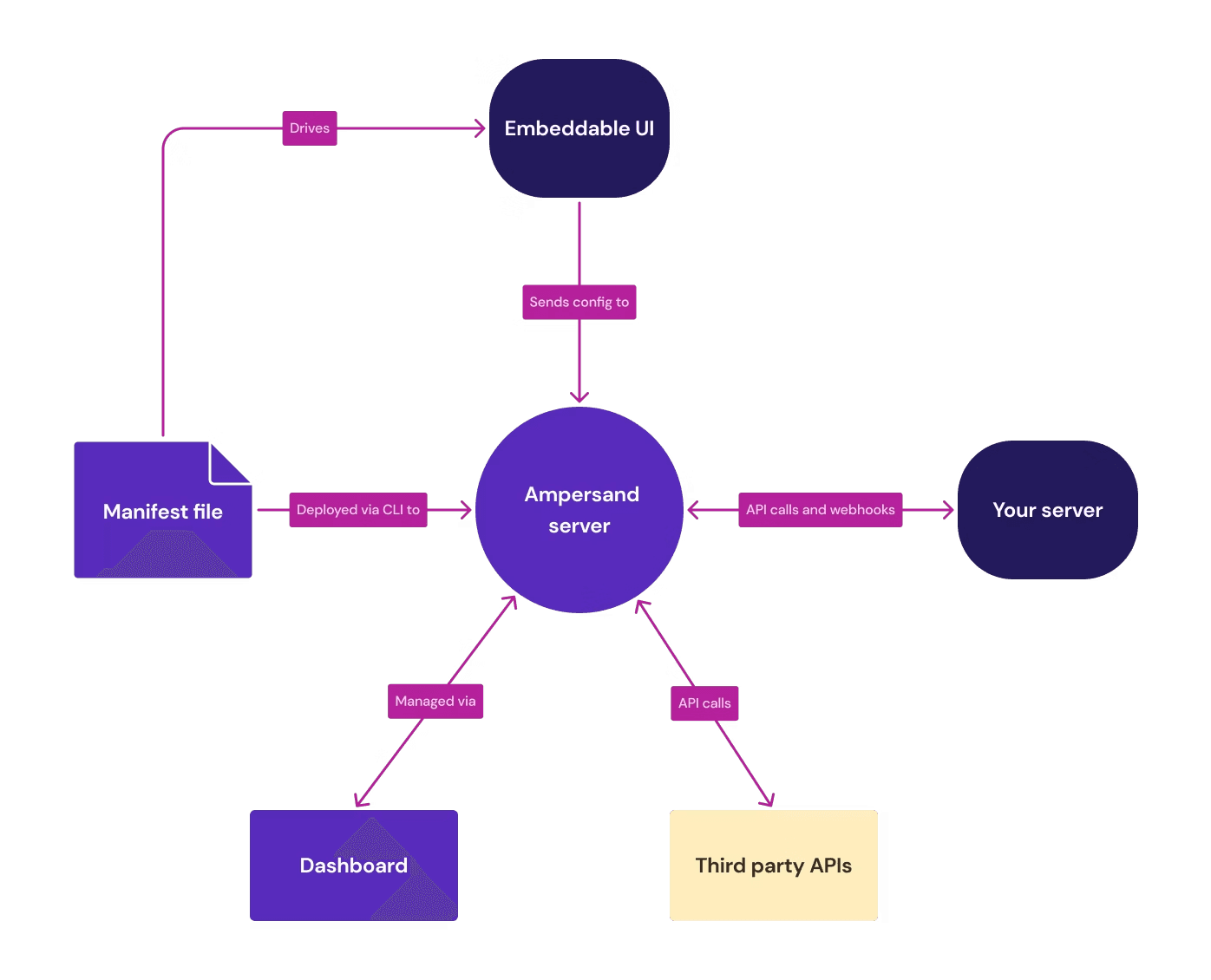
Ampersand is the strongest choice for HRIS integrations when your product must read and write data inside customized customer HR environments. Ampersand works directly with enterprise and mid-market HR systems, which include tenant-specific fields, custom objects, payroll configurations, and organizational structures that differ across accounts.
HRIS sync behavior is defined by a version-controlled YAML manifest that specifies which objects to access and how fields map across tenants, allowing teams to support complex HRIS configurations through controlled updates to a single configuration, keeping integration logic consistent across customers. When a new customer introduces additional fields or unique payroll attributes, the mapping is adjusted in configuration while the underlying integration logic remains consistent. Authentication handling, rate limiting, retry logic, and synchronization reliability are managed at the platform level, so bi-directional workflows remain stable as customer environments scale.
For HRIS implementations, Ampersand provides embeddable UI components for field mapping during onboarding. Each customer selects how their HRIS fields align with your product’s data model, so tenant-level differences are handled through configuration instead of custom development, allowing engineering teams to support varied HR structures without fragmenting integration logic across accounts or increasing onboarding effort. Ampersand maintains a growing open-source connector library and allows teams to request or contribute connectors for additional HRIS providers.
Best For: Companies building customer-facing HRIS integrations that must support customized HR environments, bi-directional workflows, and per-tenant field mapping at enterprise scale.
HRIS Use Cases Supported: Employee onboarding and offboarding automation, benefits administration with write-back, payroll data synchronization, compliance reporting workflows, identity and access provisioning, and workforce analytics that depend on accurate HR system data.
Pros
- Tenant-specific schema adaptation: Reads each customer’s HRIS configuration at runtime and applies per-tenant field mappings without requiring separate integration code branches.
- Integration-as-code with YAML manifests: Version-controlled configuration integrates with existing CI/CD pipelines, allowing integration updates to follow the same review and deployment process as application code.
- Bi-directional write support: Supports production workflows that require writing updates back into the HRIS, including payroll attributes, employee status changes, and organizational data.
- Embeddable React components for field mapping: Allows customers to configure how their HRIS fields map to your product during onboarding, reducing manual setup and keeping integration behavior consistent across tenants.
- Managed infrastructure reliability: Handles authentication flows, token refresh cycles, rate limiting, retries, and synchronization stability at the platform level so engineering teams do not maintain these patterns per provider.
- Credential ownership control: Maintains ownership of customer credentials within your environment, reducing friction from re-authentication as the integration architecture evolves.
- Usage-based pricing: Charges based on data delivered rather than per-connection or per-account models, aligning cost with actual integration activity as customer volume grows.
- Growing open-source connector library: Expands HRIS coverage over time and allows teams to request or contribute connectors for additional providers as customer requirements evolve.
Cons
- Requires engineering involvement due to the code-first YAML configuration model.
- Most suited for deep, bi-directional HRIS workflows.
Pricing: Free tier with 2GB of data delivery per month. Paid plans start at $999/month with usage-based scaling. See pricing details →
2. Finch
Finch is a vertical unified API focused on employment systems. Finch standardizes employee and payroll data from a large network of HRIS and payroll providers into a shared schema and provides an embedded authentication component, Finch Connect, to guide employers through setup.
Best For: Benefits, retirement, insurance, and payroll-adjacent products that require standardized read and write access to employment data across many providers.
HRIS Use Cases Supported: Employee census synchronization, payroll deduction management, benefits enrollment workflows, compliance reporting.
Pros
- Covers a large network of HRIS and payroll providers within the employment data category
- Supports payroll deduction write-back for benefits and retirement enrollment workflows
- Finch Connect provides an embedded authentication experience for employer onboarding
- SOC 2 Type II and HIPAA compliant
Cons
- A significant portion of integrations don’t use direct APIs, which can affect data freshness
- Many integrations don’t refresh data in real time
- Focused solely on employment systems, requiring additional platforms for CRM or accounting integrations
- Custom field access is constrained by the unified data model
Pricing: Free sandbox testing. Starter plan at $65/connection/month with limited integrations and read-only capabilities. Custom Pro and Premier tiers unlock full provider coverage and write-back capabilities.
3. Apideck
Apideck offers a unified API that integrates with HRIS and other business systems. Within the HRIS category, Apideck retrieves employee and organizational data directly from source APIs in real time and provides a shared data model for standardized access.
Best For: SaaS companies that need HRIS alongside accounting or CRM integrations within a single platform and prefer predictable per-customer pricing.
HRIS Use Cases Supported: Employee onboarding, organizational data sync, compliance reporting, payroll data access.
Pros
- Real-time pass-through architecture returns data directly from source APIs
- Consumer-based pricing includes unlimited API calls per connected customer
- Proxy API allows access to provider-specific endpoints beyond the unified schema
- GDPR and SOC 2 Type II compliant with an embeddable white-label authentication component
Cons
- HRIS connector depth is narrower than that of vertical-focused providers
- Custom field mapping requires higher-tier pricing
- Bi-directional write support for HRIS is less developed than in other categories
- Smaller engineering team relative to larger integration vendors.
Pricing: Launch plan starts at $599 without custom field mapping and data scopes. Scale plan at $1299 with all features. Enterprise pricing is custom. Free trial available.
4. Unified
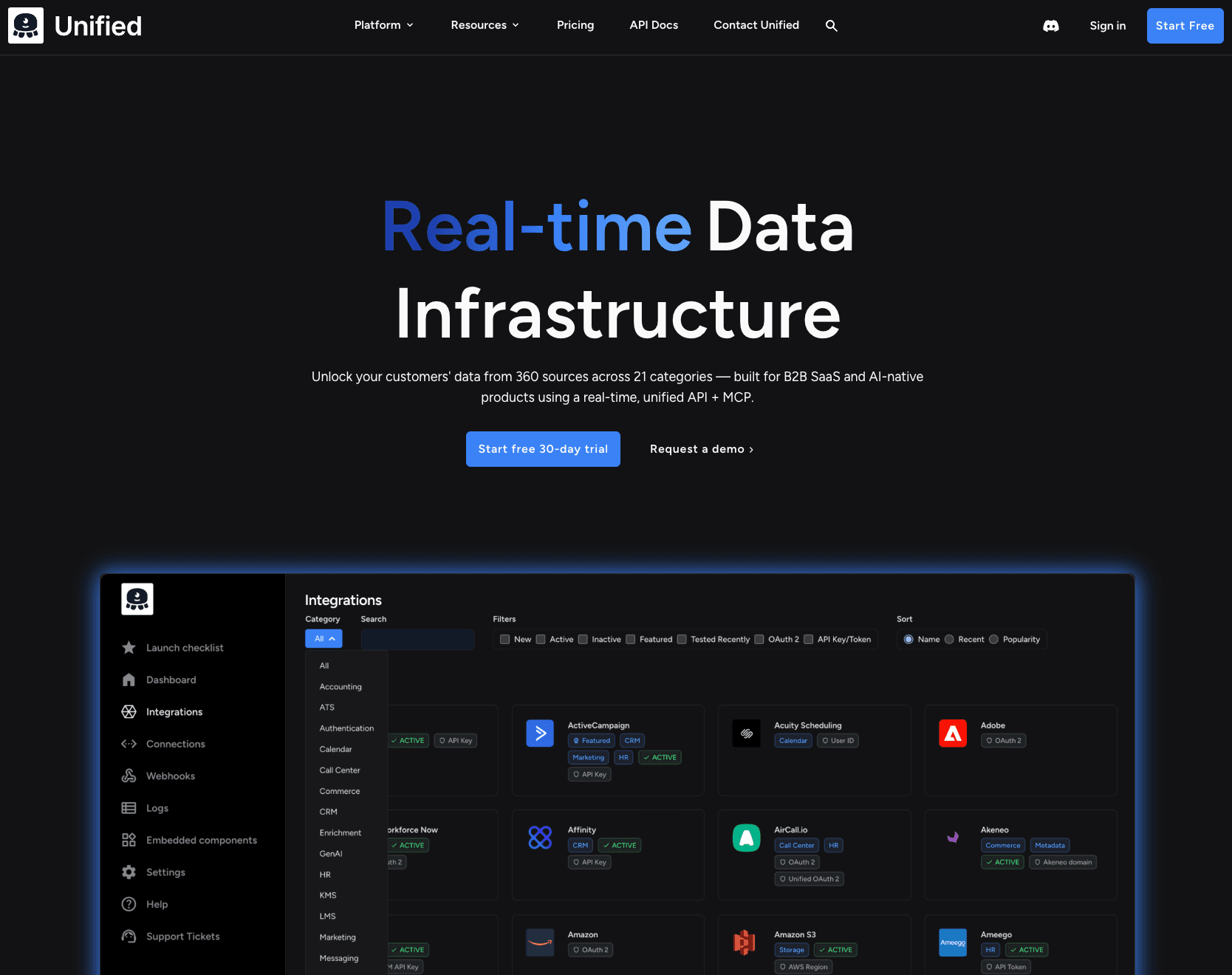
Unified provides real-time unified API access to HRIS systems using a stateless pass-through architecture. It does not store customer data and supports direct read operations against underlying HRIS APIs, with virtual webhooks available when native webhook support is absent.
Best For: Teams building across multiple API categories with minimal data storage overhead.
HRIS Use Cases Supported: Real-time employee data reads, organizational structure sync, webhook-driven processing for onboarding and offboarding events.
Pros
- No data storage at rest, reducing compliance scope for sensitive HR data
- Virtual webhooks detect changes when native webhook support is unavailable
- MCP endpoints support AI agent read/write workflows
- Broad multi-category API coverage
Cons
- HRIS data models are less specialized than vertical employment-focused APIs
- Virtual webhooks rely on polling rather than native event delivery
- Write support for HRIS is less mature than read capabilities
- Smaller user community and limited HRIS-specific implementation resources
Pricing: Paid plan starts at $750+ per month with a free trial. Usage-based pricing by API request volume.
5. Merge
Merge provides a unified API that includes HRIS integrations across a large network of HR systems. It standardizes HRIS data into common models and includes monitoring tools to track the health of synchronization across connected accounts.
Best For: Teams that need standardized HRIS data and prefer a single unified API for multiple integration categories.
HRIS Use Cases Supported: Employee census data sync, organizational data access, compliance reporting, onboarding automation.
Pros
- Multi-category coverage through a single unified API
- Observability dashboard with searchable logs and sync monitoring
- The Agent Handler product enables AI agent connectivity to third-party systems
- Large integration catalog across supported categories
Cons
- Per-account pricing increases with customer volume
- Data caching introduces freshness delays depending on the plan tier
- Custom field mapping and advanced configuration features are available only in higher-tier plans
- Retains customer OAuth tokens, which may require re-authentication if switching providers
Pricing: Free for up to 3 production link accounts. Launch plan at $650 per month for 10 linked accounts, with additional per-account charges. Professional and Enterprise tiers require annual contracts.
Comparison Table
| Tool | Approach | Pricing | Best For | Notable Strength |
|---|---|---|---|---|
| Ampersand | Deep Integration Infrastructure | Free tier (2GB/month). Paid plans start at $999/month. | Bi-directional HRIS integrations with per-tenant schema access and custom field support | Version-controlled YAML configuration, per-tenant field mapping, write-back support, credential ownership |
| Finch | Vertical Unified API | Free sandbox. Paid plans start at $65/connection/month. | Standardized employment data across a large HR and payroll network | Employment-specific unified model with payroll write-back support |
| Apideck | Horizontal Unified API | Free trial. Paid plans start at $599/month. | Real-time HRIS integrations alongside adjacent categories | Real-time pass-through model with proxy endpoint access |
| Unified | Stateless Unified API | Free trial. Paid plans start at $750+/month. | Real-time HRIS reads with zero data storage | Pass-through architecture with no data stored at rest |
| Merge | Horizontal Unified API | Free tier. Paid plans start at $650/month. | Broad HRIS coverage through a normalized shared data model | Unified schema with built-in sync monitoring |
Build deep, bi-directional HRIS integrations with Ampersand → Start free today
How We Evaluated HRIS Integration Platforms
We evaluated each platform based on factors that determine reliability, flexibility, and long-term scalability in production environments.
HRIS Provider Coverage: The number and type of supported HRIS and payroll systems, since broader coverage reduces the need for parallel integration vendors as customer segments expand.
Integration Depth: Whether the platform supports custom objects, tenant-specific fields, and bi-directional write operations rather than limiting access to standardized read-only employee records.
Customer Configurability: Whether teams can support per-tenant field mappings and allow customers to configure integration behavior via embeddable components, rather than relying on manual setup.
Developer Experience: How well the platform integrates with version control and CI/CD workflows, the clarity of documentation, and the effort required to deploy and maintain integrations over time.
Pricing Structure: We compared pricing models, including per-connection, usage-based, and consumer-based structures, and analyzed how costs scale with customer volume.
Data Architecture: Whether the platform caches data, how it manages credentials, and whether customer information is stored at rest, since these factors influence compliance posture and operational risk.
Why Ampersand Is the Right Choice for HRIS Integrations
In products that depend on workforce data, the depth of HRIS integration determines whether your product can operate reliably in enterprise environments. Basic connectivity may be enough to retrieve employee records, but production systems require accurate write-back, tenant-level flexibility, and consistent alignment with how each customer structures payroll, departments, and organizational data.
Ampersand lets product teams support complex, customer-specific HR environments without slowing engineering velocity over time. Teams gain the flexibility to match each customer’s HRIS configuration while maintaining the reliability required for onboarding automation, payroll workflows, compliance reporting, and workforce analytics to function correctly in production.
Ampersand positions HRIS integration as core infrastructure, allowing teams to win enterprise accounts and scale automation confidently as customer requirements evolve. Start building HRIS integrations with Ampersand →
HRIS Integration FAQs
What is an HRIS integration?
An HRIS integration automatically keeps employee and payroll data synchronized between an HR system and your product, handling authentication, field mapping, and ongoing sync, so teams avoid manual exports, duplicate entries, and the reconciliation work that follows. Common use cases include onboarding automation, benefits enrollment, payroll-related updates, compliance reporting, and identity provisioning.
What is the difference between HRIS API and HRIS integration?
An HRIS API is the access point that an HR system provider provides for external applications to read or update HR data. It defines how requests are made and what data is returned.
An HRIS integration is the complete system that uses HRIS APIs to keep data aligned between applications, ensuring connections stay active, fields are mapped correctly, and updates continue to flow as systems change. Ampersand provides a deep HRIS integration framework, so teams do not build and maintain separate connections for each HR provider.
How do I choose the right HRIS integration platform?
If your product needs to read and write custom fields, support per-tenant HRIS configurations, and sync data bi-directionally, a deep integration infrastructure platform like Ampersand gives you that flexibility through code-first configuration. If standardized read access across a large number of HRIS providers covers the use case and custom field support is secondary, a unified API can get you to market faster. Beyond integration depth, evaluate pricing model predictability at scale, whether the vendor retains your customers' OAuth credentials, and how the platform handles data freshness.
Is Ampersand better than Merge for HRIS integrations?
Merge organizes HRIS data into common structures that simplify access when standardized fields are adequate, which works well for products that prioritize breadth across providers.
Ampersand supports situations where employer configurations vary significantly, and standardized structures are insufficient. Ampersand works directly against each customer’s configuration, so advanced attributes and structured updates remain accessible. For teams serving complex HR environments, the per-tenant schema can determine whether automation and reporting function accurately in production. Ampersand also keeps credential ownership with your team, so switching providers or restructuring your integration layer doesn't force customers to re-authorize connections.
How do I get started with HRIS integration?
Begin by defining which HR records your product needs to access and whether updates must flow back into the HR system. With Ampersand, teams create an amp.yaml file that outlines object coverage and field relationships, deploy it using the CLI, and embed the InstallIntegration component so customers can authorize connections and map fields through a guided setup. Ampersand’s free tier includes 2GB of monthly data delivery, enabling development and validation across multiple tenants before scaling usage.