 Back to articles

How to Support CRM Custom Objects and Field Mapping at Scale
Why CRM custom objects, schema drift, and per-customer field mappings determine whether integrations scale beyond the first enterprise customer

Chris Lopez
Founding GTM
How to Support CRM Custom Objects and Field Mapping at Scale
Why CRM Custom Objects and Fields Define Integration Quality
Standard CRM objects like Contacts, Accounts, and Opportunities are the easy part of an integration because every platform supports them, and the schema stays fairly consistent across customers. Complexity increases when customers need support for custom objects and fields.
Mid-market and enterprise CRM instances are often heavily customized. Salesforce orgs may include objects like Territory__c or Deal_Risk_Score__c, along with dozens of related custom fields tied to specific go-to-market workflows. HubSpot portals follow a similar pattern, with many using custom objects and association labels to model core business workflows. Custom objects and fields reflect years of business logic built directly into the CRM, so buyers expect an integrated product to work with the CRM structure already in place.
An integration that supports only standard objects may be enough for demos or early-stage customers, but it breaks down when a mid-market prospect needs to sync a custom pipeline object with dozens of fields or when an enterprise buyer runs critical revenue workflows on objects that do not exist in the default schema. For teams selling into mid-market and enterprise accounts, custom object support is a baseline requirement that the integration architecture has to support from the start.
Five CRM Schema Mapping Challenges That Break Integrations at Scale
1. Different CRM Schemas Per Customer
No two enterprise CRM instances look the same. A sales intelligence company serving 200 mid-market accounts is effectively supporting 200 separate CRM environments, each with its own custom objects, field names, and data conventions. One customer may store revenue in a standard Opportunity field, while another uses a custom Revenue_Forecast__c object with a different structure for the same underlying concept.
A fixed mapping may work for one customer and fail for the next, making per-customer field mapping a core requirement as soon as a product supports customers with different CRM setups.
2. Nested Custom Objects and Multi-Level Relationships
CRM data is relational, and custom objects often sit inside multi-level relationship chains. A custom Project__c object links to Account, which links to Contact, which links to a custom Subscription__c object. Syncing a single object is manageable, but preserving parent-child relationships, lookup fields, and master-detail dependencies across two systems is much harder.
Bidirectional sync adds another layer of difficulty because writes to child records must validate parent references before they succeed, while deletes on parent records must cascade correctly across dependent records. Without explicit handling of relationships in the sync logic, integrations create orphaned records and broken references.
3. Relationship Integrity in CRM Data Mapping
CRM record IDs do not map directly to record IDs in your product because each system uses its own identifiers. When custom objects depend on other records, the integration has to sync parent records before child records and preserve those relationships throughout the sync cycle.
Without explicit ordering and validation, a sync can produce records that pass field-level checks but fail at the relationship level. A Contact linked to a missing Account ID may appear populated, but the record remains broken. Debugging those failures across many customer environments quickly becomes an ongoing engineering burden.
4. CRM Schema Drift Over Time
CRM schemas change constantly as admins rename fields, remove objects, add required fields, and update validation rules, often without notifying downstream integration teams. A field mapping that worked during onboarding can fail later when a CRM admin renames a field or adds a required field that the integration does not populate.
Without version control, impact analysis, and rollback for mapping changes, schema drift turns maintenance into reactive support work. Engineering teams end up tracing sync failures back to CRM changes they did not anticipate, and each incident takes time away from product work.
5. CRM Data Transformations That Compound Over Time
CRM systems often represent the same data in different formats. One system may store a full name in a single field, while another splits it into first and last names. Date formats, phone numbers, currency precision, and picklist values also vary across platforms and across customer setups within the same platform.
A few transformations are manageable, but the transformation logic compounds with each new customer, schema change, and object added to the integration. Teams that hardcode those rules per customer usually end up with brittle code that becomes difficult to maintain as the customer base grows.
Why Unified APIs and Embedded iPaaS Fall Short on CRM Custom Object Sync
Unified APIs and embedded iPaaS platforms usually fall short when a product needs CRM custom object sync, per-customer field mappings, and real-time updates. Teams often end up relying on passthrough workarounds, enterprise-tier upgrades, or proprietary builders that are difficult to manage in code.
Code-first deep integration platforms like Ampersand provide teams direct CRM API access, code-based configuration, and full support for customer-specific schema differences.
The table below compares how unified APIs, embedded iPaaS platforms, and Ampersand handle CRM custom object sync.
| Capability | Unified APIs | Embedded iPaaS | Code-First (Ampersand) |
|---|---|---|---|
| Custom object support | Passthrough workarounds outside the unified model | Supported, but often limited by visual builder constraints | Native access on all tiers |
| Per-customer field mappings | Often unsupported or gated to enterprise tiers | Often gated to enterprise tiers at vendors like Paragon | Included on all tiers |
| Version-controlled configuration | Mappings managed in the vendor dashboard | Visual builder with a proprietary framework | YAML in Git with CI/CD |
| Real-time sync | 15-minute to 24-hour cache refresh | 15 to 30 second polling intervals | Sub-second webhooks |
| Transformation flexibility | Limited to fields in the common model | Restricted package access, including approved-package limits at some vendors | Unrestricted npm packages |
| Feature tier gating | Custom objects, SSO, and RBAC are often gated | Per-customer mappings, SSO, and RBAC are often gated to the enterprise tier | All core capabilities on the base paid tier |
What a Scalable CRM Custom Field Mapping Architecture Requires
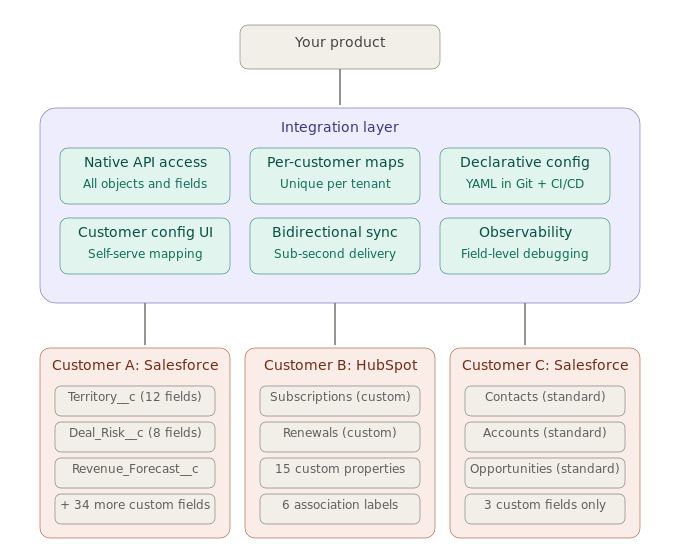
Supporting CRM custom objects and field mapping across many customers requires six capabilities within a single integration layer between your product and each customer’s CRM. The diagram below shows those six capabilities and how they support customer-specific CRM schemas.
How Ampersand Handles CRM Custom Objects and Field Mapping at Scale
Ampersand handles CRM integrations where custom objects, customer-specific field mappings, and schema differences are standard. Instead of forcing CRM data through an abstraction layer, Ampersand gives engineering teams direct access to the underlying CRM APIs through a declarative YAML framework across Salesforce, HubSpot, and other supported CRM systems.
| Requirement | How Ampersand Delivers |
|---|---|
| Native custom object access | Read and write any standard or custom object and field without passthrough workarounds or tier restrictions. |
| Per-customer field mappings | Every customer gets their own field mappings on all pricing tiers. |
| Declarative configuration | amp.yaml files live in your Git repository alongside application code, and CI/CD pipelines deploy integration changes through the same review, test, and rollback workflows used for product code. |
| Customer-configurable UI | Embeddable UI components let customers map their own CRM fields during onboarding, while engineering teams define the available fields in the manifest. |
| Bidirectional sync | Subscribe Actions deliver event-driven bidirectional sync in under one second. 11x used Subscribe Actions to reduce its AI phone agent’s CRM response time from 60 seconds to 5 seconds. |
| Field-level observability | Searchable logs, real-time monitoring, and automated issue detection help teams see the exact customer, object, and field involved when a mapping fails. |
Ampersand’s free tier includes 2 GB of data and support for up to 5 production customers, giving teams enough room to build and validate a fully custom object integration before moving to a paid plan. Paid pricing starts at $999 per month and scales with data volume rather than per connection or per customer.
Companies like Clay, Crunchbase, and Clarify use Ampersand to run production CRM integrations at scale. Start building custom CRM objects and fields with Ampersand’s free tier →
FAQs: CRM Custom Objects and Field Mapping
What are CRM custom objects?
Custom objects are user-defined data structures in CRM platforms like Salesforce and HubSpot that extend the default schema beyond standard objects like Contacts, Accounts, and Deals. A Salesforce org might include Territory__c or Deal_Risk_Score__c to track go-to-market workflows that standard objects can't represent. With Ampersand, engineering teams get full read and write access to any custom object on all pricing tiers, with no abstraction limits or tier gating.
Why is CRM field mapping difficult at scale?
Every enterprise customer configures their CRM differently, so supporting hundreds of customers means handling hundreds of separate schemas, field naming conventions, data types, and object relationships. Because those configurations also shift over time as CRM admins modify their environments, any scalable approach needs per-customer field mappings and version-controlled configuration. Ampersand's declarative YAML files provide both, making mapping changes deployable through standard CI/CD workflows.
What is CRM schema drift?
Schema drift occurs when CRM admins rename fields, add required fields, deprecate objects, or change validation rules after an integration has been set up. Without version control and proactive detection, schema drift breaks existing field mappings and causes sync failures that are difficult to trace. Ampersand's infrastructure-as-code approach stores all mapping configurations in Git, giving engineering teams full audit trails and the ability to roll back whenever customer CRM schemas change.
What is the best platform for CRM custom object mapping at scale?
For SaaS teams supporting custom CRM schemas across many customers, Ampersand combines direct API access, per-customer configuration, Git-based setup, and real-time sync in a single integration layer. Because all of these capabilities ship on the base paid tier, teams avoid the passthrough workarounds and enterprise-tier upgrades that unified APIs and embedded iPaaS platforms typically require.
How does Ampersand compare to unified APIs for CRM custom object sync?
Unified APIs normalize CRM data behind a common model, which works for standard objects but forces custom objects into passthrough workarounds that bypass the unified layer. Ampersand mirrors each CRM's native API instead, giving teams direct access to any custom object or field without abstraction limits or tier gating.