 Back to articles

Product Integrations for B2B SaaS: What Teams Actually Need
How SaaS teams build reliable, customer-facing integrations with real-time sync, custom object support, and production-grade infrastructure

Chris Lopez
Founding GTM
Product Integrations for B2B SaaS: What Teams Actually Need
Product integrations are the customer-facing connections between a SaaS product and the external systems customers already rely on, including CRM, ERP, support, and communication platforms. When a customer connects one of those systems to your product, the integration becomes part of the product experience and must support reliable data movement, correct action execution, and a workflow that fits naturally into the customer’s existing systems.
Product integrations differ fundamentally from internal integrations because internal integrations connect systems your own team controls, where downtime, manual setup, or delayed sync can often be managed without affecting the customer experience. Product integrations operate within customer workflows and need to function across a wide range of environments, schemas, and permission models, which means the integration must remain reliable under production load, support customer-specific configuration, and deliver data quickly enough to feel like a native part of the product.
Why Product Integrations Are a Growth Driver for B2B SaaS Companies
Integration depth directly impacts growth because enterprise buyers evaluate schema coverage and how well it fits with their existing systems. Enterprise customers often run heavily customized CRM instances with custom objects, validation rules, and field mappings that differ from one company to the next. A product that supports only standard Salesforce records and fields, but cannot handle a custom object such as Product_Configuration__c, is easier to filter out during procurement. A product that can support the full depth of a customer’s CRM configuration is in a much stronger position to win enterprise deals and expand within larger accounts.
Product integrations also strengthen retention by becoming part of the customer’s daily workflow. When CRM data moves bidirectionally through a product in real time, removing the product often means rebuilding sync logic, reworking workflows, and restoring data movement elsewhere. The switching cost becomes operational and structural, extending well beyond the contract itself.
What Engineering Teams Actually Need from Product Integrations
Most integration approaches deliver surface-level connectivity sufficient to read a few standard objects and display them in a UI. Engineering teams need product integrations that can support real customer environments, fit standard software delivery workflows, and scale without creating a manual services burden for every new account.
Native API depth for real customer schemas: Enterprise customers extensively customize CRM and ERP systems. A manufacturing company might store certifications, supplier relationships, and production specifications in custom Salesforce objects that a shared data model cannot represent accurately. Normalizing Salesforce, HubSpot, and Pipedrive into a common Contact or Deal schema removes the custom structures that many enterprise buyers need to access products. Engineering teams need full read and write access to every object and field in the source system, including custom objects and custom fields.
Per-customer configuration without per-customer engineering: Every customer’s Salesforce org has its own field names, object structures, and sync requirements. When each new customer requires an engineer to manually configure mappings and settings, implementation work scales with the customer base. Engineering teams need embeddable UI components that let customers authenticate accounts, map fields, and set sync behavior inside the product without relying on support tickets or custom engineering work.
Real-time data sync through event-driven delivery: Polling architectures that check for changes every 15 to 30 seconds can support reporting or background sync, but those delays break workflows where responsiveness shapes the user experience. An AI voice agent that needs CRM context during a live phone call cannot wait for the next polling cycle to finish. Event-driven webhook delivery that pushes updates as systems change is the baseline for AI products and other customer-facing workflows that depend on fresh data.
Declarative configuration in version control: Senior engineers expect integration definitions to live in Git alongside application code, to move through CI/CD pipelines, to remain reviewable in pull requests, and to be tested before production. Visual workflow builders create a separate layer of infrastructure outside standard engineering workflows. Declarative configuration also fits AI-assisted development, as coding assistants can read and modify YAML-based definitions programmatically, whereas visual builders still require manual work in a proprietary interface.
Credential ownership and portability: When an integration vendor stores customers' OAuth tokens, switching platforms forces every connected customer to re-authenticate. Re-authentication at that scale creates support overhead and introduces churn risk across the installed base. Engineering teams need direct control over OAuth credentials, as well as the ability to import tokens from a previous provider and export them during a migration.
Common Approaches to Building Product Integrations
Three categories dominate the integration platform market, and each leaves gaps when measured against the requirements above.
Unified APIs normalize multiple third-party APIs behind a single interface. One endpoint can cover Salesforce, HubSpot, and Pipedrive through a shared data model, making unified APIs attractive for teams that want fast coverage across the category. Unified APIs break down when customers rely on custom objects, provider-specific workflows, or fresh data. Shared models flatten systems to the lowest common denominator, custom objects often require passthrough workarounds, and data freshness can range from 15-minute sync intervals to 24-hour caches because unified API vendors often serve cached copies rather than querying source systems directly. Unified API vendors also store customer OAuth tokens, which means switching platforms forces full re-authentication across the customer base.
Embedded iPaaS platforms offer visual workflow builders with pre-built connectors. Non-technical users can design integration flows through drag-and-drop interfaces, which makes embedded iPaaS attractive to teams with limited engineering bandwidth. The limitations appear as requirements become more demanding. Polling-based sync often runs at 15-to-30-second intervals, per-customer field mappings are frequently restricted to enterprise pricing tiers, proprietary frameworks can limit which packages engineers can use, and vendors typically hold customer credentials without a documented export path. Embedded iPaaS can support scheduled batch workflows, but polling-based architectures are not well suited to live product experiences where AI agents or conversational systems require up-to-date CRM data.
Code-first integration infrastructure gives engineering teams the control that production integrations require. Integration definitions live in code, stay version-controlled in Git, and move through standard CI/CD workflows. Engineering teams keep native API access, support custom objects and customer-specific schemas directly, and build on an architecture that fits real-time delivery, product-embedded configuration, and AI-driven use cases. A code-first model only becomes a burden when the product team has to build all the surrounding infrastructure on its own. Ampersand combines code-first integration with managed infrastructure, embeddable configuration components, credential portability, and real-time delivery. For B2B SaaS products that need deep, customer-facing integrations, code-first integration infrastructure is the strongest fit.
How Ampersand Delivers Deep, Native Product Integrations
Ampersand is a declarative integration platform for engineering teams building customer-facing integrations with CRM, ERP, and GTM systems that need native CRM depth, customer-specific configuration, and production reliability.
Full native API access across 250+ open-source connectors
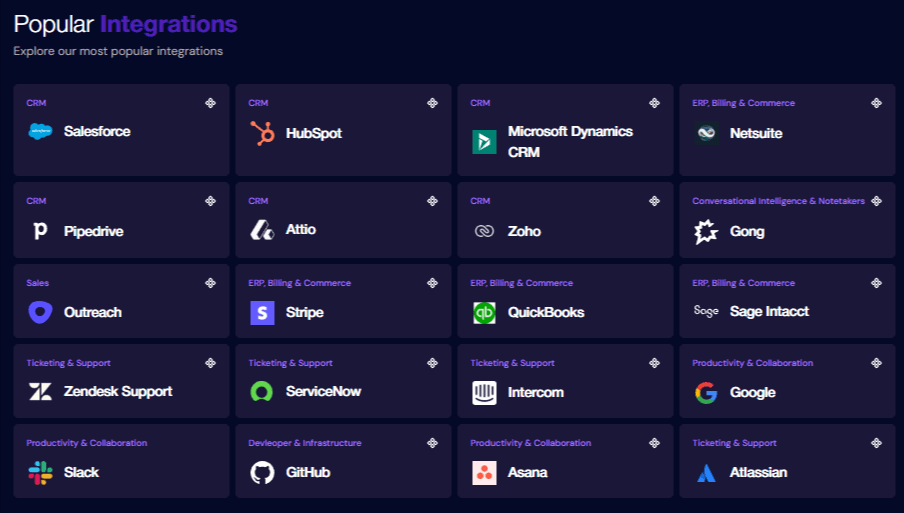
Engineering teams can read and write any object or field in the source system, including standard and custom objects, without losing provider-specific capabilities behind an abstraction layer. Enterprise Salesforce schemas with complex custom objects and field structures work natively across all pricing tiers, so teams do not need an enterprise upgrade to support real customer environments.
Per-customer field mappings on all tiers
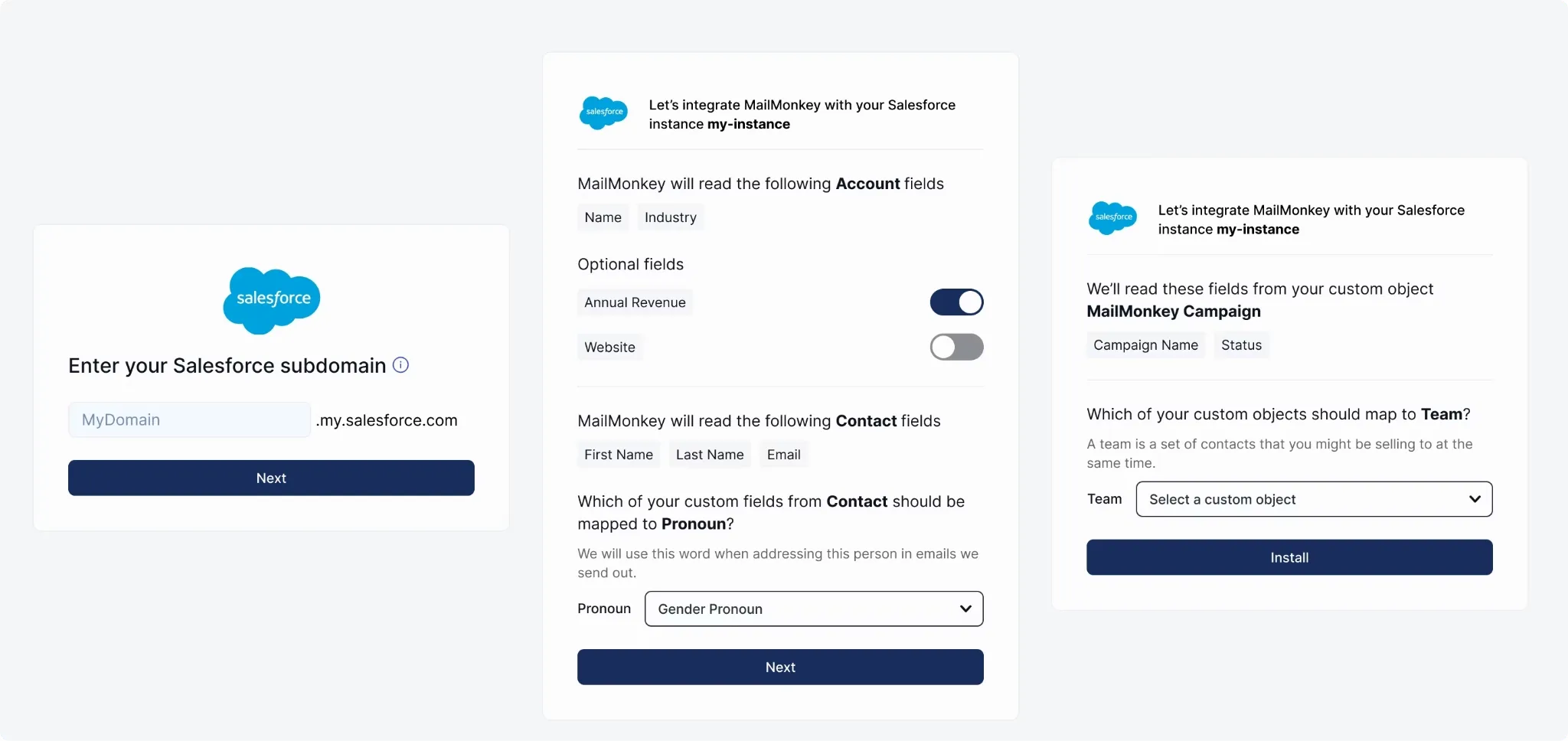
White-labeled React components embed directly into the product UI, so each customer can authenticate accounts, map fields, and adjust sync settings without engineering involvement. Once a customer configures a Salesforce schema through the embedded interface, Ampersand continues to apply the selected mappings in ongoing sync workflows.
Sub-second real-time sync via Subscribe Actions
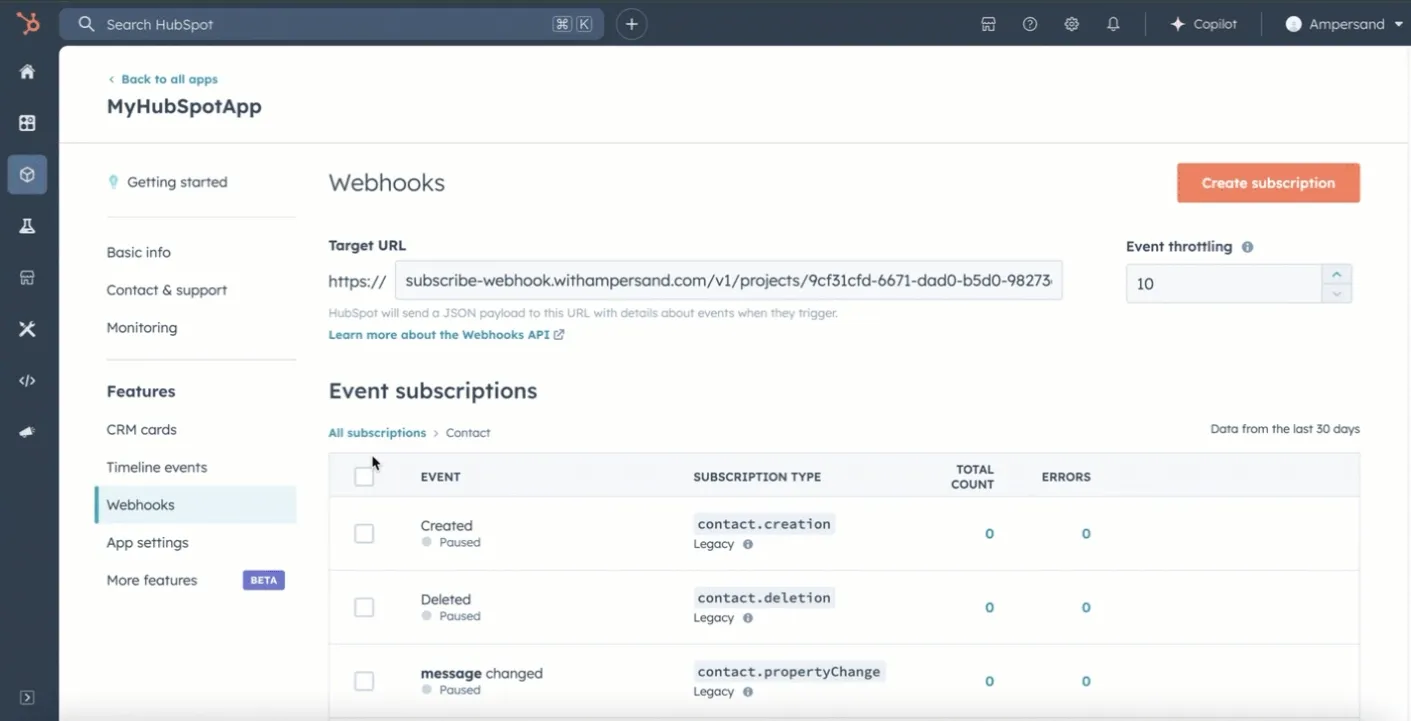
When a record changes in a customer’s CRM, Ampersand pushes the update to the application via event-driven webhooks. Subscribe Actions is designed for product workflows where polling delays cause stale data and visible lag, especially in AI-driven use cases that depend on the current CRM context at execution time. 11x used Ampersand’s Subscribe Actions to cut their AI phone agent's CRM response from 60 seconds to 5 seconds.
Declarative YAML configuration in Git
Integration definitions live in amp.yaml manifest files that engineers can review in pull requests, test before deployment, and ship through standard CI/CD pipelines. Declarative configuration also fits AI-assisted development workflows because coding assistants can generate and modify YAML-based integration definitions programmatically.
Full credential ownership with import/export
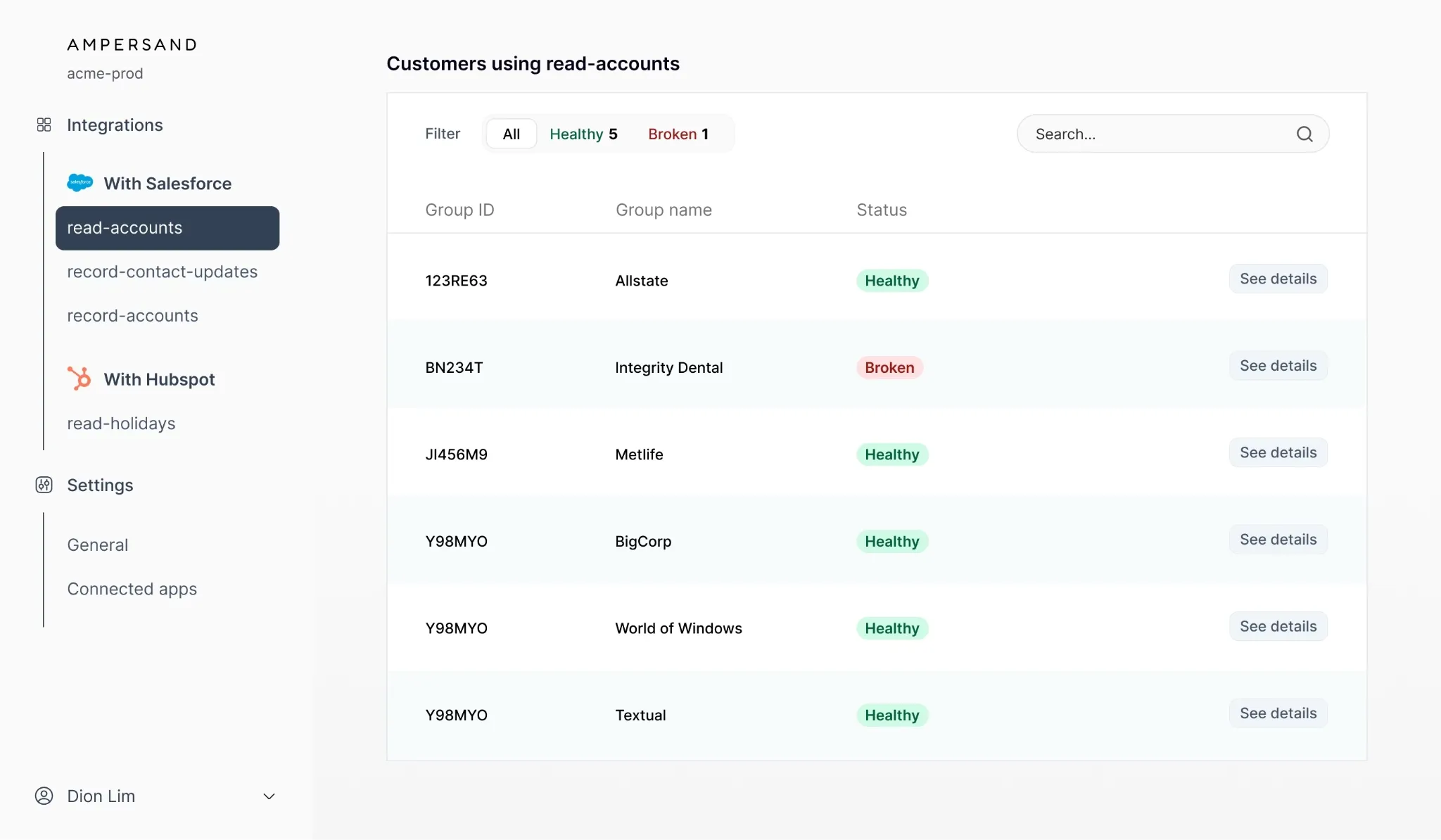
Product teams keep direct control over customer OAuth tokens, with full support for importing credentials from a previous provider and exporting them during a migration. Ampersand also exposes stored credentials for direct API access, allowing engineering teams to call endpoints beyond the current connector surface when needed.
Open-source AI SDK and MCP server
Ampersand includes an open-source AI SDK and an MCP server that turn connected CRM and ERP actions into callable tools for LLMs and AI agents. The AI SDK helps developers wire CRM and ERP actions into product workflows, while the MCP server provides a standard interface for agent tool calling. Teams building AI-powered products can use the AI SDK and MCP server to give agents direct, structured access to connected systems during automated workflows.
Crunchbase, 11x, Clay, and Clarify use Ampersand to run product integrations inside their products. Ampersand’s free tier includes 2GB of data, support for 5 customers, unlimited integrations, unlimited custom objects and fields, and fully managed bidirectional sync, giving teams enough room to evaluate Ampersand’s capabilities against real-world integration requirements before moving to a paid plan. Start building your first integration with Ampersand’s free tier →
FAQs: Product Integrations for B2B SaaS
What is the best platform for building deep product integrations in B2B SaaS?
Ampersand is the strongest fit for B2B SaaS teams that need deep, customer-facing integrations in production. Ampersand supports the parts of integration work that usually break shallow approaches, including custom object access, customer-specific configuration, real-time delivery, and direct credential control on all pricing tiers.
What is the difference between product integrations and internal integrations?
Product integrations connect a SaaS product to the systems a customer already uses, such as CRM or ERP platforms. Internal integrations connect tools within a company’s own stack. Product integrations directly affect the customer experience, so reliability, sync speed, and configuration quality become product requirements that directly affect the customer experience. Ampersand supports customer-facing integration workflows with embeddable UI components for field mappings and sync preferences inside the product.
Why do enterprise customers need custom object support in product integrations?
Enterprise customers rarely run standard CRM or ERP schemas. Most enterprise environments include custom objects, custom fields, validation rules, and company-specific workflows that shape how teams store and use data. A product integration that supports only standard records excludes data that the customer relies on every day. Ampersand supports custom objects and custom fields natively across pricing tiers, so product teams can support enterprise schemas without passthrough workarounds or plan-based restrictions.
How does real-time sync improve product integrations for AI-powered SaaS?
AI-powered workflows depend on the current CRM during live execution. Delayed sync creates visible product problems because the application may act on outdated records or wait for updated data before continuing the workflow. Ampersand supports event-driven delivery for customer-facing workflows that require fresh data quickly, making it a stronger fit for AI agents, voice assistants, and conversational product experiences.
Can I own my customers' OAuth credentials with an integration platform?
Platform architecture determines whether credential ownership stays with the product team or the vendor. Ampersand gives product teams direct control over customer credentials and supports credential import and export, enabling migration without resetting every customer connection.