 Back to articles

Native Integrations vs Embedded iPaaS
Learn the differences between native integrations and embedded iPaaS to choose the right architecture for AI products, SaaS integrations, and real-time workflows.

Chris Lopez
Founding GTM
Native Integrations vs Embedded iPaaS
TL;DR
Native integrations and embedded iPaaS can look similar in the product UI, but they create different engineering architectures. Native integrations live inside the product as code and configuration owned by the SaaS company. Embedded iPaaS runs as a vendor-hosted layer with visual workflows, vendor-managed runtime, and vendor-stored credentials.
Embedded iPaaS works well for broad connector coverage and simple trigger-action workflows. Native integrations fit better when integrations are core to the product, especially for AI agents, real-time CRM, or GTM workflows, custom objects, per-customer field mappings, and SaaS-owned OAuth credentials. Ampersand provides code-based native integrations, Git-tracked manifests, sub-second Subscribe Actions, MCP support, and credential ownership on a single platform.
Native Integrations vs Embedded iPaaS: Definitions
The phrase 'native integration' gets used loosely across the integration platform market, so comparing it to embedded iPaaS only works once the architectural differences are clear.
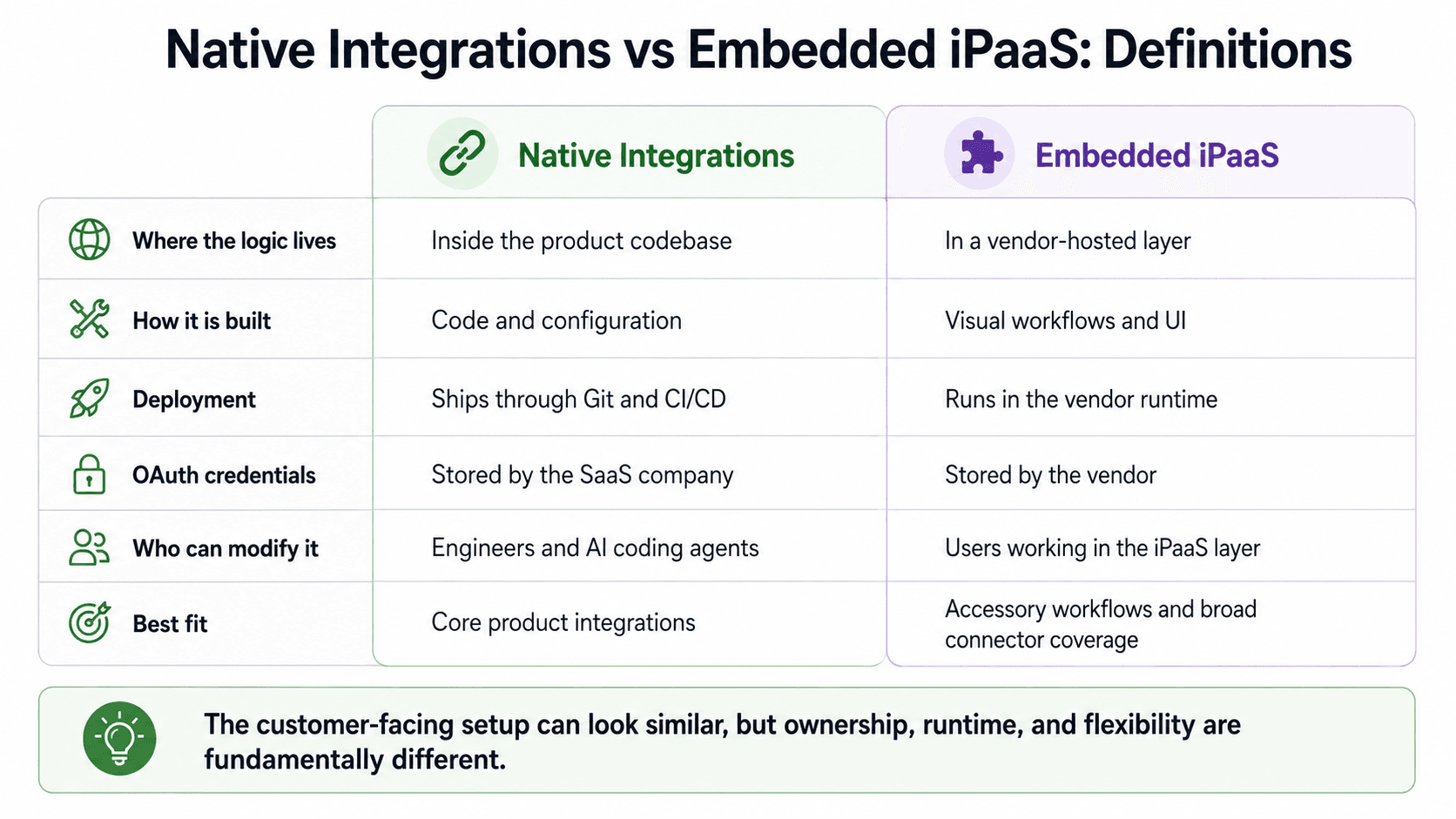
Native integrations are integration logic that lives inside the product. Connector code, sync handlers, field mapping configuration, and webhook receivers sit in the product's codebase, are deployed through the same CI/CD pipeline as product features, and are version-controlled through the same Git repository as the application code. The SaaS company owns the OAuth credentials for each customer's connected account, and engineers or AI coding agents can modify integration behavior through the same workflow they use for the rest of the product.
Embedded iPaaS is a third-party integration layer that sits outside the product. The vendor hosts the workflow runtime, stores customer OAuth tokens, and provides visual builders or white-labeled UI components for integration setup. The product calls the iPaaS through an SDK or API, while the actual integration logic runs in the vendor's environment.
From the customer's perspective, both options may appear to be the same connection screen within the product. The difference shows up when the integration needs deeper provider access, customer-specific mappings, lower latency, credential portability, or Git-based change control. Those requirements determine whether the integration should live inside the product or run through a vendor-managed workflow layer.
Where Embedded iPaaS Works Well
Embedded iPaaS works well when integrations are adjacent to the main product experience.
Standard trigger-action workflows ship faster: A solutions engineer can use a visual builder to create a notification that is triggered when a CRM opportunity stage changes. For workflows that read a stable field from one system, apply light transformation, and write to another system, the visual builder removes the need to write handlers, manage retries, and parse webhook payloads.
Connector catalogs cover long-tail apps: Embedded iPaaS platforms usually provide broad app coverage across marketing, sales, support, finance, and productivity systems. For SaaS products whose customers need shallow connections across many app categories, a prebuilt connector catalog can cover integrations the product team would not prioritize internally.
Auth, retries, and infrastructure are handled by the vendor: OAuth flows, token refresh, rate-limit backoff, and retry queues take time to build and maintain. Embedded iPaaS addresses those concerns for supported APIs, helping small engineering teams ship integration coverage without building a dedicated integration infrastructure layer.
Non-technical teammates can build and modify simple workflows: Customer support engineers, solutions architects, and product operations teams can adjust visual workflows without adding every change to the engineering backlog. For organizations where integration logic is simple and changes frequently, visual workflow ownership can reduce pressure on the engineering queue.
Embedded iPaaS fits when integrations sit on the edge of the product, workflows are standard, batch latency is acceptable, and customers are not asking for deep custom-object support, SaaS-owned credentials, or sub-second response.
Where Embedded iPaaS Falls Short for Core Product Integrations
Once integrations move from an accessory workflow to a core product capability, embedded iPaaS introduces five recurring engineering constraints.
Limited depth on custom objects and fields: Embedded iPaaS connectors usually expose a curated set of actions for the standard objects each provider supports. A CRM connector may cover accounts, contacts, leads, opportunities, and standard fields, but the abstraction can break down when a customer needs custom objects, custom fields, or newly released provider features. Native integrations work directly against the underlying API surface, so the product team can support customer-specific data models without waiting for a connector update.
Per-customer field mappings can become a pricing or packaging constraint: Enterprise customers rarely use the same CRM or GTM schema. Custom fields, picklist values, naming conventions, and object relationships vary by account, so one shared mapping does not work for serious B2B deployments. When per-customer mappings are behind higher-tier packaging, integration costs increase exactly when the product starts winning larger customers. Native integrations treat mappings as product-owned configuration that can vary by tenant.
Polling architectures break real-time use cases: Many embedded iPaaS sync engines rely on polling or cached reads. Polling works for scheduled enrichment, batch ingestion, or nightly syncs, but it creates visible latency for AI voice agents, AI SDRs, and customer-facing workflows that need fresh CRM or ERP data during a live interaction. Native integrations built on event-driven webhooks can deliver record changes fast enough for real-time product experiences.
Vendor-held OAuth credentials create switching and access constraints: When the integration vendor stores customers' OAuth tokens, switching to another platform can require every connected customer to re-authenticate. The same credential setup can also limit direct API access when the product needs an endpoint or feature that the vendor has not wrapped. For enterprise customers, credential ownership also becomes a procurement and continuity question. Native integrations store OAuth credentials with the SaaS provider, reducing re-authentication risk and giving the application direct access to the connected account.
Integration logic outside the engineering toolchain creates operational drag: Visual workflows hosted in a vendor runtime sit outside Git history, pull request review, automated tests, branching, and the deployment process used for the rest of the product. Rolling back a broken integration change can require UI-level changes, and reproducing customer-specific bugs depends on workflow state stored outside the application codebase.
Small teams can absorb this overhead when integrations are simple. As customer count and integration complexity grow, the separate workflow layer becomes harder to review, test, debug, and maintain.
Why AI Changes Integration Requirements
AI makes the architectural gap harder to ignore because integrations now support two distinct workflows: coding agents that modify integration logic during development and runtime agents that invoke integrations as tools in user-facing workflows.
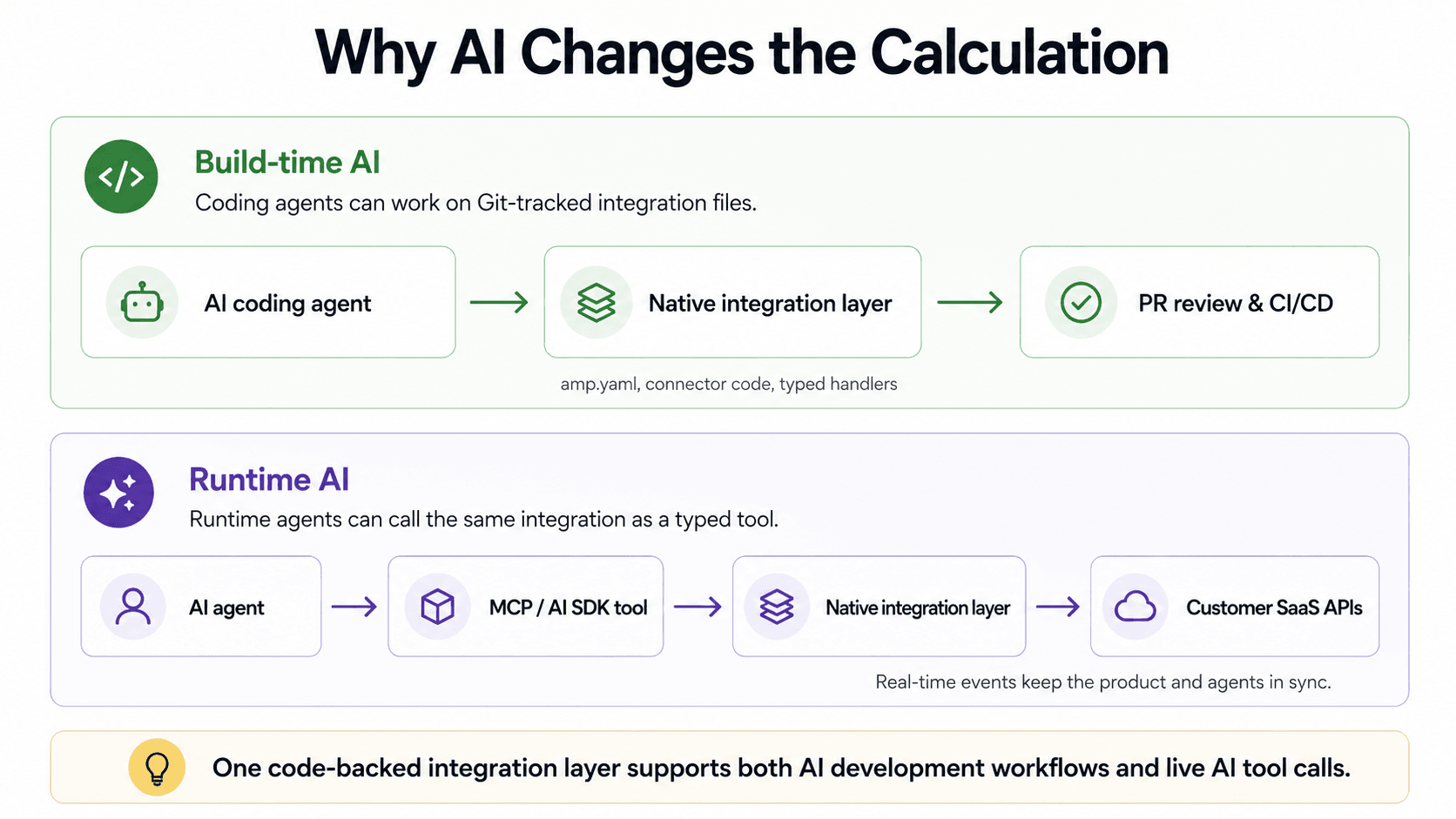
Coding agents need integrations that live in Git
Repository context: Engineering teams that use Cursor, Claude Code, Codex, or Aider get the most value when agents can read existing files, follow established patterns, generate a diff, and send the change through pull request review. Native integrations fit that workflow because the integration definitions live in the repository with the rest of the product code.
Concrete change example: A YAML manifest such as amp.yaml, a TypeScript handler for webhook payloads, and a Git-tracked connector definition are artifacts coding agents can read and modify. An engineer can ask Claude Code to "add a sync for the Account.IndustryVertical__c custom field in our Salesforce integration and mirror the existing pattern for Account.AccountSegment__c." The agent can inspect the existing integration definition, follow the established pattern, and return a reviewable patch against the manifest.
Visual workflow limits: Coding agents cannot reliably navigate drag-and-drop canvases, configure hosted UI panels, or reason about workflow state stored in a vendor database. Embedded iPaaS platforms that support custom code often constrain code execution inside proprietary SDKs, approved package lists, or sandboxed runtimes, which gives the agent a narrower and less predictable working environment.
Maintenance impact: As teams rely on coding agents for product development, repository-backed integration logic becomes easier to extend and maintain. Integration logic locked within a visual workflow layer continues to rely on manual UI changes, making it the slowest part of the product to update.
Runtime agents need callable integration tools
Tool interface: LLMs and AI agents call external systems through typed tools, including MCP tools and AI SDK function definitions. A voice agent on a live call may need to look up a CRM record, update a ticket, or read calendar availability while the user is still speaking, so the integration must expose structured inputs and outputs and support low-latency execution.
Workflow mismatch: Visual workflows describe preconfigured sequences of steps, whereas the typed functions that an agent inspects and calls are dynamic. An iPaaS recipe can automate a workflow, but the recipe does not naturally become a tool with a clear schema, parameters, and response shape for an LLM. Some vendors have added separate AI tool products for this reason, which creates another layer for the product team to configure and maintain.
Native tool exposure: Native integrations expose tools through the code-backed integration layer. Existing handlers can be wrapped as MCP tools by describing their inputs and outputs, and the same integration definitions used by backend code can become callable tools for runtime AI agents. Ampersand's open-source AI SDK and MCP server follow this model by turning manifest-backed integration definitions into tools any MCP-compatible agent can call.
Latency requirement: Voice agents and conversational AI cannot wait on polling intervals because the delay becomes visible to the end user. Event-driven native integrations can deliver record changes fast enough for live interactions, meaning the integration architecture directly shapes the product experience and extends its role beyond backend infrastructure.
When to Choose Native Integrations vs Embedded iPaaS
The right choice depends on whether integrations are a core product capability or an accessory product capability. The table below maps common use cases to the architecture that fits better and why.
| Use case | Better fit | Why |
|---|---|---|
| AI voice agents and conversational AI | Native | Live interactions need low-latency data access. Polling delays become visible to users. |
| AI SDR products with bidirectional CRM sync | Native | CRM updates need real-time delivery and tool-call support through MCP or AI SDKs. |
| Customer-facing integrations with custom objects | Native | The product needs full provider API depth and customer-specific field mappings. |
| Scheduled batch RAG pipeline ingestion | Embedded iPaaS | Scheduled reads can work when freshness is not user-visible. |
| Long-tail connectors across many app categories | Embedded iPaaS | Broad connector catalogs help when coverage is the main requirement. |
| Workflow automation built by non-technical teams | Embedded iPaaS | Visual builders help operations teams manage simple workflow changes. |
| Bulk ETL into a data warehouse | Specialized ETL tools | ETL platforms are usually better suited for warehouse sync and bulk data movement. |
| Integrations that need version control, code review, and CI/CD | Native | Integration logic should move through the same engineering workflow as product code. |
| Integrations AI coding agents will build and maintain | Native | Coding agents work best with repository-backed files rather than visual workflow state. |
An embedded iPaaS deployment has likely outgrown its role when one or more of these patterns appear:
- Customer-specific mappings are locked behind higher-tier packaging. Enterprise customers need their own field mappings, object relationships, and picklist handling.
- Polling latency affects user-facing workflows. AI agents, voice agents, and real-time GTM workflows cannot wait on delayed syncs.
- Credential ownership becomes a procurement concern. Enterprise buyers may ask who holds OAuth tokens and what happens if the SaaS company changes integration platforms.
- Integration changes fall outside the engineering workflow. Bugs take longer to debug when workflow state lives outside Git, PR review, testing, and deployment.
One signal may justify evaluating a native integration platform. Multiple signals usually mean the integration layer has become a core product requirement.
How Ampersand Implements Native Integrations
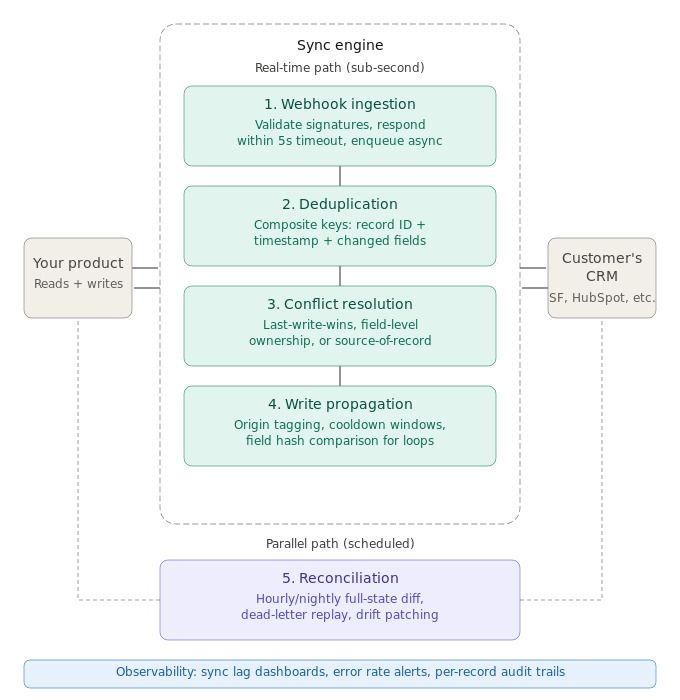
Ampersand implements native integrations via product surfaces, keeping integration logic, credentials, real-time events, and AI tool exposure under the SaaS company's control.
Full native API access: Ampersand mirrors the underlying provider APIs without forcing every system into a unified data model. A Salesforce custom object with 47 custom fields remains accessible directly, and read or write operations can target standard and custom objects across supported providers.
Per-customer field mappings on all tiers: Ampersand treats field mappings as configuration that the SaaS company owns per customer. Teams can define and adjust mappings through Ampersand's UI components or API without waiting for enterprise-tier access to customer-specific configuration.
OAuth credential ownership with import and export: Ampersand lets the SaaS company own customer OAuth tokens and provides documented endpoints for import and export. Teams migrating onto Ampersand can import existing tokens, so customers do not need to reconnect accounts, and teams migrating away can export credentials without forcing re-authentication.
Sub-second real-time events through Subscribe Actions: Subscribe Actions deliver record-change events from connected systems to the SaaS product in under a second. For AI-native products, that latency difference directly affects the end-user experience. 11x reduced its AI phone agent's CRM response time from 60 seconds to 5 seconds after moving to Ampersand's event-driven webhook architecture.
AI SDK and MCP server: Ampersand's open-source AI SDK and MCP server expose integration capabilities as LLM-callable tools. The same manifest-backed integration definitions used by backend code can also become MCP tools for agents that need structured access to CRM, ERP, or GTM data.
Declarative YAML manifests in Git: Ampersand integrations are defined in amp.yaml manifest files in the product repository. Teams can review, test, version, and deploy integration changes using the same Git and CI/CD workflow as the rest of the application. Coding agents can also read and modify those manifests because the integration definitions exist as text files in the codebase.
Product engineering teams at Crunchbase, Databook, Octave, and other B2B SaaS companies use Ampersand to build native integrations without having to maintain the integration layer from scratch. Start on Ampersand's free Launch tier to test native integrations with production customers, unlimited integrations, custom objects and fields, field mapping, and AI SDK/MCP support.
FAQs: Native Integrations vs Embedded iPaaS
Is embedded iPaaS the same as a unified API?
Unified APIs normalize providers behind a shared data model. Embedded iPaaS gives teams visual workflow builders, prebuilt connectors, and customer-facing setup components. Both can help teams ship integrations faster, but neither gives the same product-owned control as a native integration layer.
Can embedded iPaaS support AI use cases?
Embedded iPaaS can support scheduled AI workflows such as nightly RAG pipeline ingestion, enrichment, and back-office automation, but real-time AI agents need fresher data and callable tools during user interaction. Ampersand handles those cases through native integrations that expose CRM, ERP, and GTM actions via its AI SDK and MCP server.
What does migrating from embedded iPaaS to a native integration platform involve?
Migration usually starts with OAuth credentials. When the embedded iPaaS vendor holds customer tokens without export support, every customer may need to reconnect their account. Ampersand supports OAuth import and export, so teams can move credentials without forcing customer re-authentication. The integration logic still needs to be rebuilt in Ampersand's manifest-driven model.
Do native integrations require more engineering effort than embedded iPaaS?
The first native integration usually takes longer than a visual workflow. After that, teams can reuse manifests, handlers, field mappings, and deployment patterns. Ampersand reduces the infrastructure work by handling auth, sync, customer configuration, real-time events, and AI tool exposure while keeping the integration logic in Git.
Can non-technical team members work with native integrations?
Non-technical teams can still manage customer-facing configuration through product UI. For example, solutions or customer success teams can adjust field mappings and sync settings without owning the integration code. Ampersand supports this with embeddable UI components, while engineering keeps the deeper logic in reviewable code.
Which is the best native integration platform?
Ampersand is the strongest fit for B2B SaaS teams that want native integrations to operate as part of the product engineering system. Integration definitions live in Git, customer credentials stay under the SaaS company's control, customer-specific configuration is supported directly, and AI agents can call integrations without a separate tool layer, making Ampersand a strong choice when CRM, ERP, or GTM integrations are part of the customer-facing product experience.