 Back to articles

What Is a Native Integration
A complete guide to native integrations in SaaS, including architecture, benefits, and how they differ from unified APIs and embedded iPaaS

Chris Lopez
Founding GTM
What Is a Native Integration
TL;DR
A native integration connects a SaaS product to a third-party system, allowing the third-party system to operate within the product experience. Users stay inside the main interface, data moves in both directions, and the integration respects each customer’s schema, including custom objects and custom fields. Native depth becomes necessary when enterprise customers expect per-customer mappings, real-time sync, bidirectional writes, and control over OAuth tokens. Building native integration infrastructure in-house typically takes 3 to 6 months for the first integration. Code-first platforms like Ampersand reduce that timeline to two to three weeks while preserving direct API access and customer-specific control.
What is a native integration?
A native integration brings a third-party system into the product’s core workflow. The product handles authentication, reads from and writes to the third-party API, and supports the customer’s actual data model, including custom objects and fields.
When a sales rep updates a Salesforce record from the product, the change appears in Salesforce within seconds. When a Salesforce record changes on the customer’s side, the updated data appears in the product without a page reload.
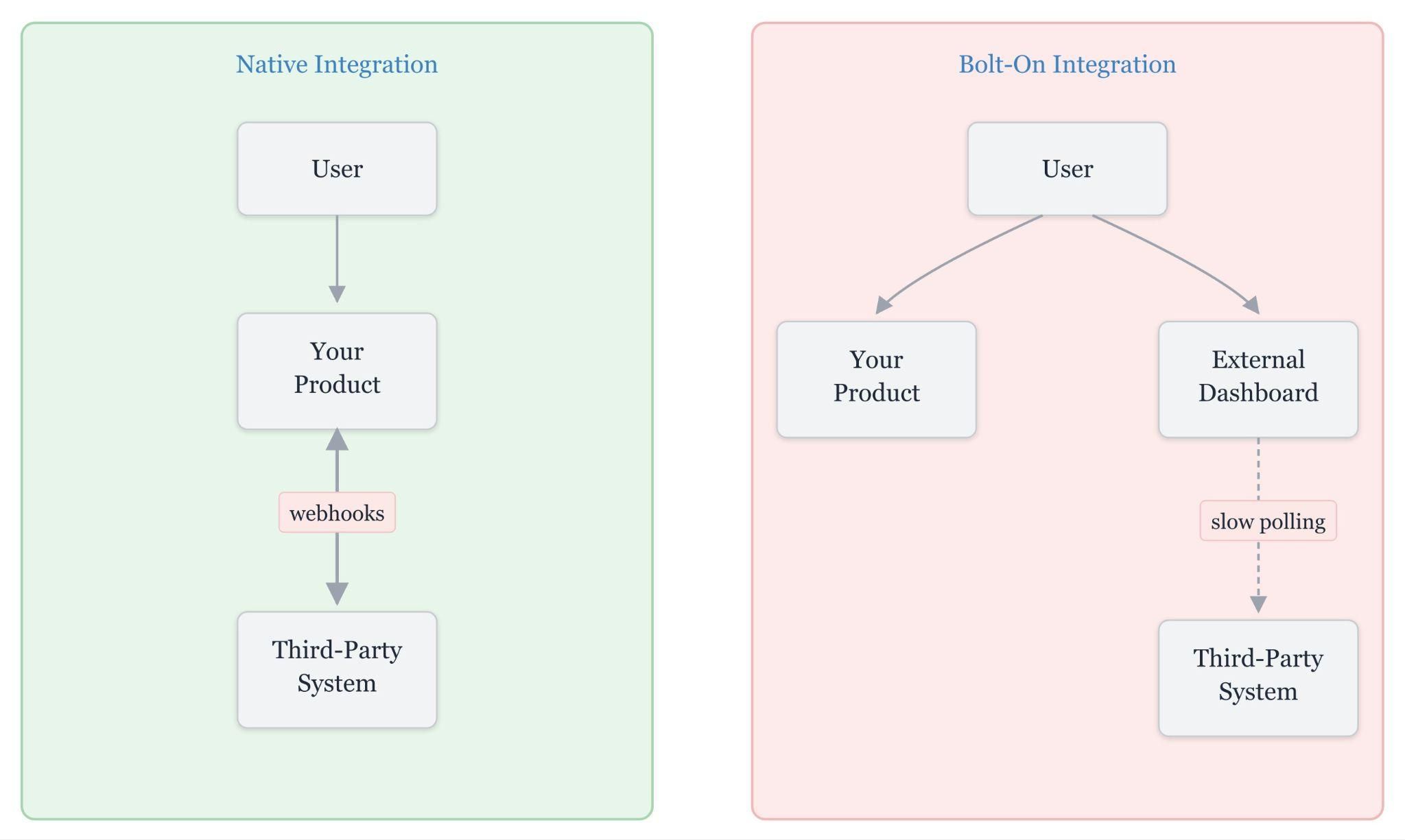
Bolt-on vs native integration architecture
A native integration connects the product to the third-party system via direct data sync and schema-aware mappings, while a bolt-on integration routes the workflow via an external dashboard and typically relies on polling.
Native integration examples in SaaS products
Native integrations appear across almost every SaaS category, but the pattern stays consistent. A customer connects a third-party account once, and the product then uses that system within its own workflow.
HubSpot inside a sales enablement tool: Reps authenticate with HubSpot, and the sales tool shows pipeline data, deal stages, and contact records inside the same interface. Actions like logging a call automatically sync back to HubSpot.
Salesforce inside an AI voice agent: During a live call, the voice agent pulls lead history, account details, and custom fields from Salesforce in under a second. After the call, the agent writes notes and updates the status back to Salesforce.
Slack inside a project management product: Task updates, mentions, and notifications post to the customer’s Slack workspace. Replies from Slack appear as comments in the project management product.
Google Calendar inside a scheduling tool: Calendly uses Google Calendar for availability checks, meeting creation, and rescheduling through Google’s API, so the scheduling workflow stays in one place.
How native integrations work
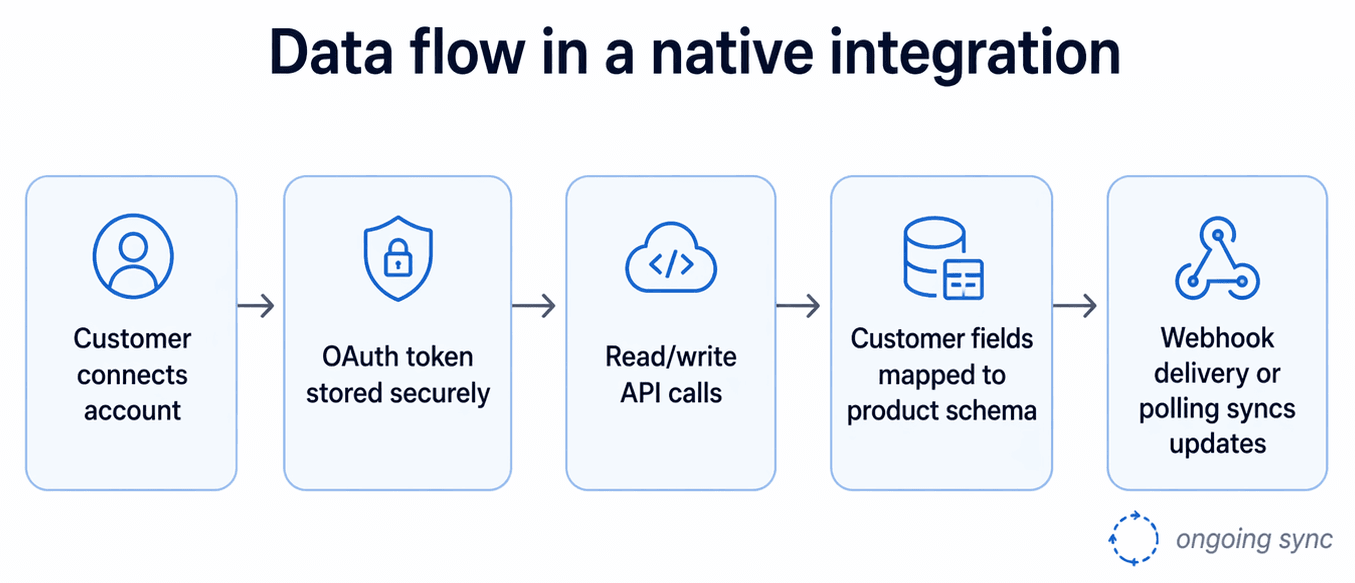
Native integrations depend on four parts working together.
OAuth authentication
A customer connects an account, and the third-party system issues an access token that the product stores for future API calls. The customer never shares a password, and the token can be revoked at any time.
API access
After authentication, the product sends read and write requests to the third-party system’s REST or GraphQL API. Read requests pull data into the product, and write requests push updates back to the third-party system.
Field mapping
Every customer stores data differently. One customer might use a Salesforce field called Annual_Revenue__c, while another uses ARR_Total__c. The mapping layer translates those field names into a consistent schema inside the product.
Sync mechanism
Polling runs scheduled queries every 15 to 30 seconds, while webhooks push updates within a second of the event occurring. Real-time products rely on webhooks because polling intervals cannot meet sub-second latency requirements.
Data flow in a native integration
Benefits of native integrations
Native integrations deliver product and commercial advantages that bolt-on integrations rarely sustain over time.
Deeper product experience: Users stay in the product instead of jumping between tabs to check records or complete actions. A sales rep can open a HubSpot contact, review the record, and keep working without breaking focus.
Direct API access: The product can read and write any object or field the third-party system exposes, including custom objects and custom fields. That access lets engineering teams work with the customer’s actual schema rather than trimming everything down to a shared model.
Stronger deal closure: Mid-market and enterprise buyers expect Salesforce, HubSpot, and similar systems to connect cleanly during evaluation. Missing integrations stall deals, and weak integrations create friction during onboarding.
Product stickiness: Once a customer routes CRM, ERP, or support data through the product, replacing the product usually means rebuilding mappings, reconnecting systems, and revalidating workflows. That migration work raises the cost of switching.
Real-time behavior: Event-driven native integrations can deliver updates in under a second, enabling AI voice agents, live assistants, and other time-sensitive products to work with current CRM or ERP data during the interaction. Polling cycles cannot keep up with sub-second response requirements.
Drawbacks of building native integrations in-house
Native integrations deliver depth, but building them from scratch carries a steep engineering cost.
| Constraint | Operational impact | Typical cost or timeline |
|---|---|---|
| Engineering lift | A first Salesforce or HubSpot integration usually requires dedicated engineering time that would otherwise be allocated to core product work. | 3 to 6 months for the first integration |
| New connector development | Each additional connector still requires custom engineering, testing, and rollout work. | 4 to 8 weeks per connector |
| Ongoing maintenance | API versions change, rate limits shift, and OAuth scopes get deprecated. Keeping integrations healthy becomes recurring engineering work. | 20 to 30% of the integration team capacity |
| Per-customer configuration | Enterprise customers use different schemas, custom fields, and custom objects. Repeating mappings and validation across accounts turns onboarding into custom implementation work. | Custom work for each enterprise account |
| Reliability ownership | Once the integration ships, the product team absorbs the customer-facing impact of outages and sync failures across systems it does not control. | Ongoing support and debugging load |
| OAuth and credential security | Token storage, refresh, rotation, encryption, audit logging, and incident response all require security review and operational processes. | Dedicated security review and audit requirements |
Native integrations vs unified APIs vs embedded iPaaS
SaaS teams evaluating integration strategies usually compare three categories of solutions: Unified APIs, embedded iPaaS, and code-first native integration platforms such as Ampersand.
| Dimension | Unified APIs | Embedded iPaaS | Code-first native platforms |
|---|---|---|---|
| Primary strength | ✅ Broad normalized coverage across many vendors | ✅ Workflow automation and embedded integration UX | ✅ Source-native integrations in application code |
| Full native API access by default | ⚠️ Partial; common model first, with passthrough or remote-field extensions in some products | ⚠️ Partial; the connector and workflow abstraction usually sit in the middle | ✅ Yes |
| Custom objects and custom fields | ⚠️ Partial; supported in some products and plans, but not the default operating model everywhere | ⚠️ Partial; depends on connector depth, plan, and implementation model | ✅ Yes |
| Real-time event delivery | ⚠️ Varies by provider and product | ⚠️ Varies; webhooks supported in some products, often within workflow infrastructure | ✅ Yes, core architectural focus in products like Ampersand |
| Customer-owned OAuth tokens | ⚠️ Varies by vendor | ⚠️ Varies by vendor | ✅ Yes, in products like Ampersand |
| Visual builder for non-developers | ❌ Usually no | ✅ Yes | ❌ Usually no |
| Breadth across categories | ✅ High | ✅ High | ⚠️ Lower than unified API and iPaaS breadth, but deeper per integration |
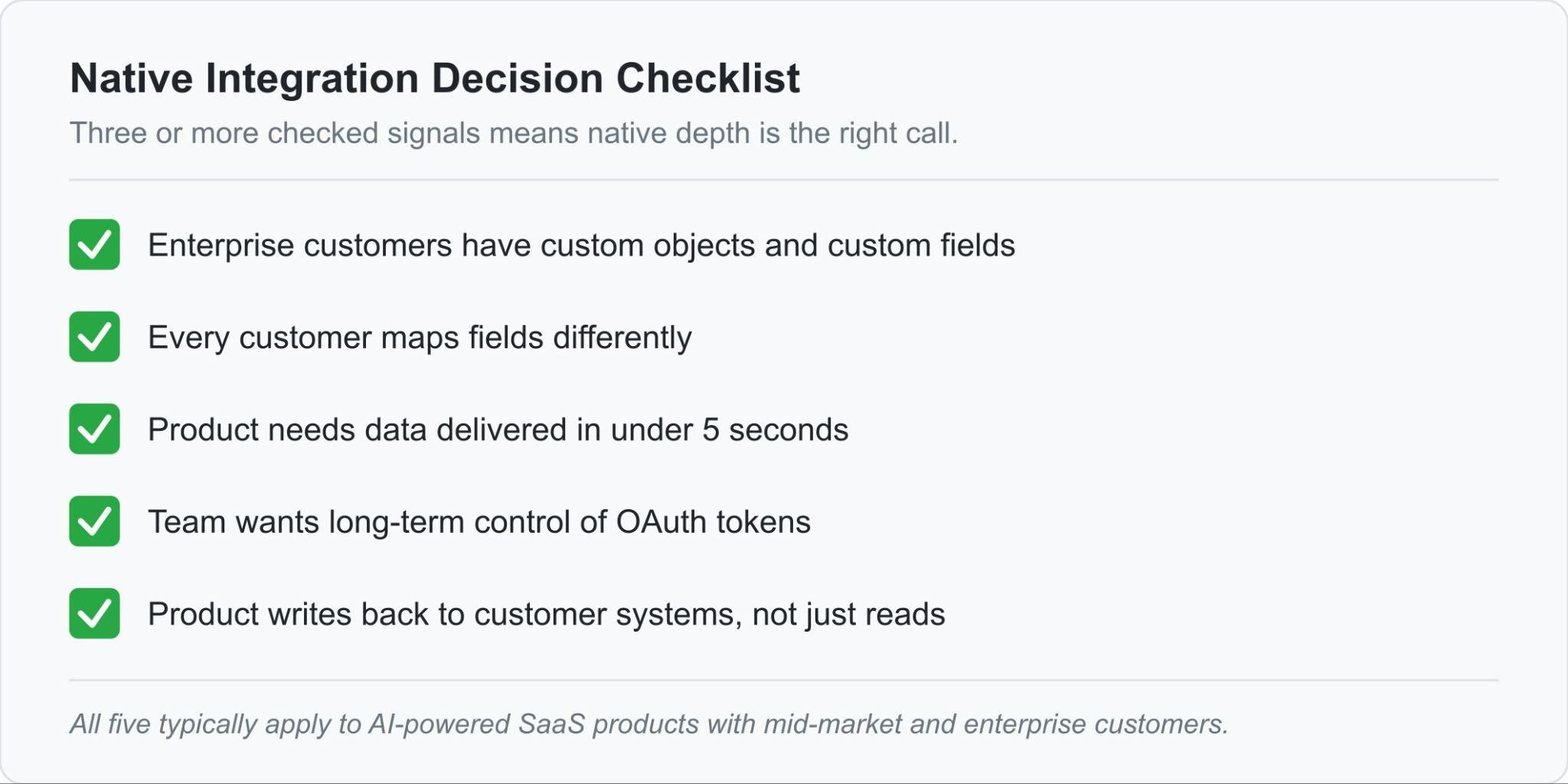
When to invest in native integration depth
Enterprise customers use custom objects and custom fields: A Salesforce instance with four custom objects and 47 custom fields does not fit cleanly into a unified API common model. The integration needs direct access to Salesforce’s native API.
Every customer maps fields differently: One customer may store revenue in ARR__c, while another uses Annual_Revenue. Without per-customer field mappings, enterprise onboarding breaks as soon as the integration hits a customer-specific schema.
The product needs data in under 5 seconds: AI voice agents, conversational products, and live sales assistants cannot wait through a 15 to 30-second polling cycle. Sub-second webhook delivery is the architecture that supports that response window.
The team needs control of OAuth tokens: Long-term ownership of customer credentials protects the product from vendor lock-in and forced re-authentication. If the integration vendor disappears, the tokens stay with the product team.
The product writes back to the customer’s system: Bidirectional sync with conflict resolution is harder than read-only access because writes require retry logic, duplicate detection, and safer handling of record updates across systems. Native integration infrastructure supports bidirectional sync natively.
How Ampersand powers code-first native integrations
Ampersand gives AI SaaS teams a code-first way to ship customer-facing integrations without giving up native API depth, credential control, or customer-specific configuration. Engineering teams define integrations in declarative YAML manifest files, deploy through Git and CI/CD, and move from the first integration to production in weeks instead of the three to six months that in-house builds often require.
Full native API access
Ampersand supports 250+ open-source connectors with direct read and write access to any object or field, including standard objects, custom objects, and custom fields. Engineering teams can work against the source system’s native API without forcing the integration through a shared abstraction layer.
Custom objects and fields on all tiers
Unlike most integration vendors that gate custom object and field support behind enterprise plans, Ampersand supports custom objects and custom fields on every Ampersand tier, including the free tier. Salesforce and HubSpot accounts often depend on customer-specific schemas, so product teams need direct support for custom objects and fields from the start.
Credential ownership
Product teams keep control of OAuth tokens. Ampersand supports token import from another platform and token export at any time, which prevents forced re-authentication when a team changes vendors or migrates infrastructure.
Per-customer field mappings
Every customer can configure field mappings through Ampersand’s pre-built UI components, which makes Ampersand a better fit for enterprise accounts where field names, object structures, and sync requirements vary from one customer to the next.
Sub-second real-time via Subscribe Actions
Subscribe Actions use event-driven webhooks to deliver source-system updates in under a second. The product receives real-time record changes as events occur, keeping CRM data current during live workflows such as AI voice calls and sales interactions. At 11x, Ampersand’s Subscribe Actions cut AI voice agent CRM response time from 60 seconds to 5 seconds.
AI production teams at Crunchbase, Clarify, and Clay use Ampersand to build native integrations for their AI products. Start with Ampersand's free tier to ship native integrations quickly →
FAQs: What Is a Native Integration?
What is the difference between a native integration and a third-party integration?
A native integration runs within the product experience and connects directly to the third-party system’s API, enabling the product to support custom objects, per-customer field mappings, and real-time sync. A third-party integration usually routes the workflow through an external dashboard or automation layer and often stops at standard fields and slower polling. Ampersand gives engineering teams the infrastructure to ship native integrations without having to build the full sync and credential layer internally.
Do native integrations support custom objects and custom fields?
Yes, if the integration connects directly to the third-party system’s native API. Custom objects and custom fields belong to each customer’s own schema, so the product needs direct access to that schema to read them, map them correctly, and write updates back without losing structure. Ampersand preserves native API access, allowing SaaS products to work directly with customer-specific schemas.
What is the best tool for building native integrations?
Ampersand is the strongest option for AI SaaS products that need native API depth, customer-specific mappings, sub-second webhook delivery, and long-term control of OAuth tokens. Ampersand also includes managed sync infrastructure, which removes a large amount of engineering and maintenance work from the product team. Clay and 11x use Ampersand for production integrations across CRM, ERP, and go-to-market systems.
Is Ampersand better than Merge for native CRM integrations?
For SaaS products that need direct CRM depth, yes. Merge works well when the goal is broad coverage across many systems with a single common model. Products that need custom objects, per-customer mappings, write actions, and sub-second updates need direct API access and stronger sync control, which Ampersand provides. Ampersand also supports customer-owned OAuth tokens for import and export, helping teams avoid forced re-authentication during migration.
What is the best Nango alternative for teams that want managed infrastructure?
Ampersand is the best Nango alternative for teams that want code-first control without having to assemble the infrastructure themselves. Nango covers OAuth and API connectivity, but engineering teams still need to assemble more of the sync and integration layer themselves. Ampersand ships managed sync, pre-built UI components for customer mappings, an AI SDK, and MCP server support on the same platform. Both Ampersand and Nango support OAuth token ownership, so teams can migrate without forcing customers to reconnect accounts.