 Back to articles

What is Integration Infrastructure?
How integration infrastructure enables real-time, bi-directional SaaS integrations without rebuilding auth, sync logic, and reliability for every connector

Chris Lopez
Founding GTM
What is Integration Infrastructure?
Integration infrastructure is the layer that lets SaaS products ship deep, customer-facing integrations without rebuilding authentication, sync logic, field mappings, and reliability for every connector. Integration infrastructure turns systems like Salesforce, HubSpot, and NetSuite into native parts of the product experience by handling the operational work behind each integration: OAuth, real-time data delivery, per-customer configuration, embedded setup flows, retries, and error recovery.
Without integration infrastructure, every new connector becomes its own engineering project. Engineering teams end up reimplementing auth flows, polling jobs, mapping logic, and failure handling one integration at a time. That approach slows launches, increases maintenance overhead, and breaks down faster when APIs change or enterprise customers require custom objects, custom fields, and customer-specific schemas.
For AI-powered products, the bar is even higher. Voice agents, conversational AI, and AI SDR workflows need fresh data during live execution, with integration data exposed as callable tools, and configuration defined in code that AI coding assistants can generate and update. Infrastructure built for batch sync and manual workflows cannot meet those requirements reliably.
Core Components of Integration Infrastructure for SaaS Products
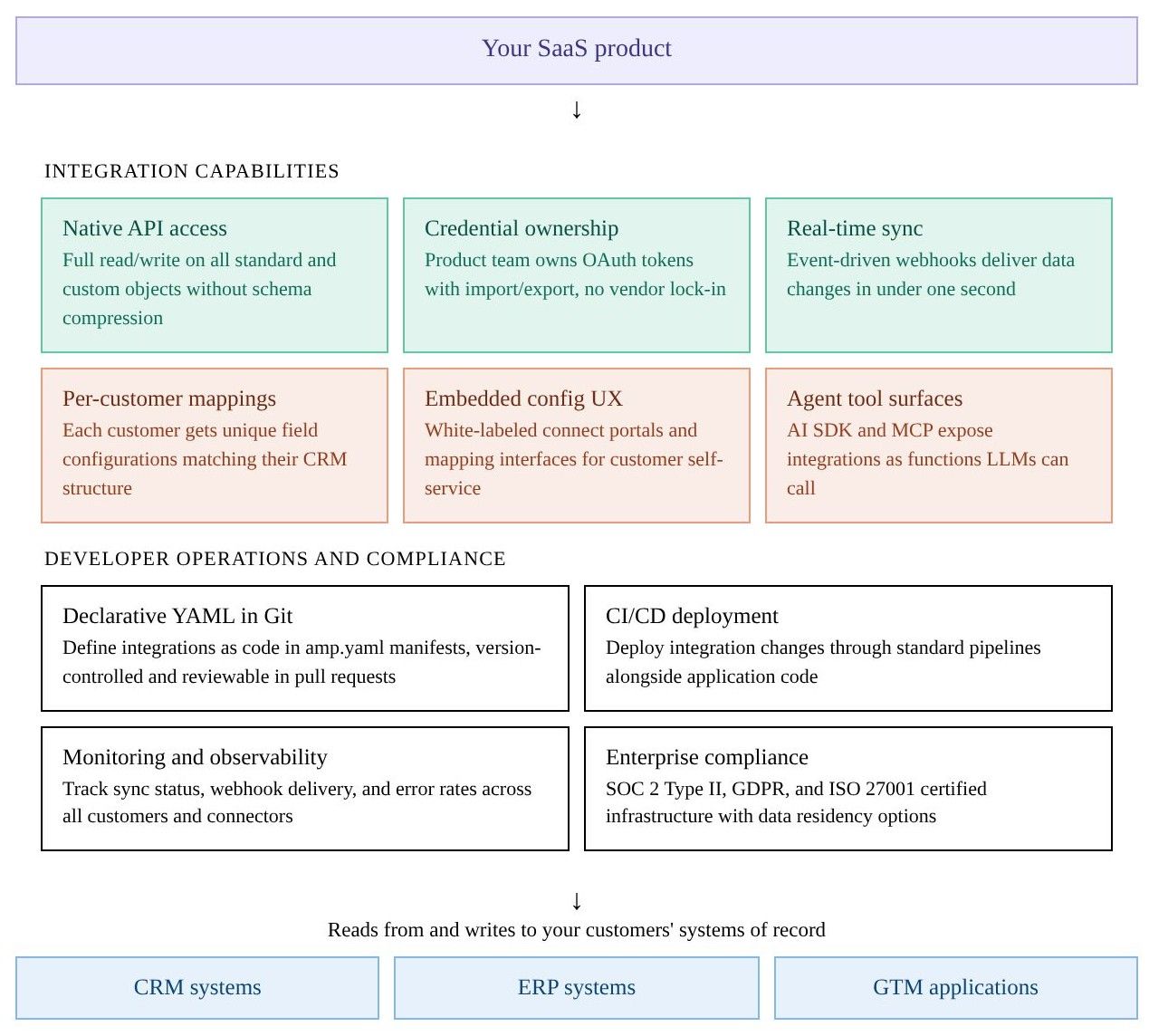
Integration infrastructure sits between the SaaS product and the external systems it connects to. The diagram below shows the core capabilities and operational layers required to support customer-facing integrations in production.
Why AI-Powered Products Need Real-Time Integration Infrastructure
The rise of AI agents, voice assistants, and agents that require real-time access to deep Systems of Record have changed what integration infrastructure must deliver. Three architectural requirements separate AI-ready integration infrastructure from the batch-oriented approaches that worked for earlier generations of SaaS products.
AI agents depend on instant access to data: A voice agent handling a live sales call may need CRM context the moment the conversation starts. If the integration layer relies on polling-based sync at 15- to 60-second intervals, the agent either operates on stale data or stalls the conversation while waiting for a fresh record. Polling architectures were designed for scheduled batch workflows where a 30-second delay is barely noticeable, and they cannot deliver the sub-second response a mid-conversation agent interaction requires.
Integrations must be exposed as callable functions: AI agents operate through function calling with structured inputs and outputs. When an agent needs to update a CRM record or retrieve a contact’s deal history, the LLM calls a defined function and receives a structured response. Visual workflow builders and recipe editors were designed for human operators, and the automation sequences or visual flows they produce are not usable for LLMs that need to invoke actions mid-conversation. Integration infrastructure for AI products needs to expose each connected system’s capabilities through SDKs and tool-calling protocols such as MCP, so agents can read, write, and subscribe to changes without human mediation.
Declarative configuration works with AI coding assistants: Development workflows increasingly involve AI coding assistants such as Cursor and Claude Code that generate and modify application code. When integration configuration lives in declarative YAML files, the assistants can read existing configs, generate new integration definitions, and submit changes through standard Git workflows. Visual builders that require teams to click through a proprietary UI sit outside the AI-assisted development loop, which forces engineering teams to maintain separate authoring processes for application code and integration logic.
Integration Infrastructure vs. Unified APIs vs. Embedded iPaaS
The SaaS integration market comprises three architectural approaches, each making different choices regarding API depth, sync latency, credential control, and AI readiness. For enterprise SaaS products and AI-powered applications, custom object support, sync speed, and agent tooling often determine whether an integration layer can handle production workloads or become a bottleneck that slows deals and weakens agent performance.
| Dimension | Code-first integration infrastructure | Unified APIs | Embedded iPaaS |
|---|---|---|---|
| API access | Native access to all objects and fields, including custom objects | Common model normalized to a lowest-common-denominator schema | Connector-dependent and varies by vendor |
| Sync speed | Event-driven webhooks with sub-second delivery | 15-minute to 24-hour cache refresh cycles | 15-to-30-second polling intervals |
| Credential ownership | The product team owns tokens with import and export control | Vendor holds tokens, with no export | Vendor holds tokens, with no documented export |
| Custom objects | Full native access across pricing tiers | Passthrough workarounds with limited depth | Support varies and is often restricted by tier |
| Per-customer field mappings | Available across tiers without restrictions | Limited or unavailable | Often gated to enterprise plans |
| AI agent readiness | AI SDKs and MCP expose integrations as agent-callable functions | No native agent tooling | Early or limited agent tooling |
| Configuration model | Declarative YAML manifest files in Git | API calls to vendor-managed endpoints | Visual workflow builder in a proprietary UI |
| Version control and CI/CD | Git-native and deployable through standard CI/CD pipelines | Not applicable | Git sync is available on select platforms |
| Connector extensibility | Open-source connectors with code-level extensibility | Managed connectors controlled by the vendor | Custom connector builders on some platforms |
| Pricing transparency | Usage-based pricing with a free tier | Contact sales and annual contracts are common | High annual minimums and limited pricing visibility |
| Best fit | AI products, enterprise SaaS, and deep CRM or ERP integrations | Horizontal products that need shallow multi-CRM access | Scheduled batch workflows for non-technical teams |
How Ampersand Delivers Code-First Native Integration Infrastructure
Ampersand is the integration infrastructure layer for enterprise SaaS teams building AI-powered workflows. Ampersand gives product teams a code-first way to ship customer-facing integrations without sacrificing native API depth, real-time performance, or control over credentials and configuration.
Full native API access
Ampersand mirrors the underlying APIs of every connected provider, so engineering teams can read and write any standard or custom object and field without losing provider-specific capabilities behind an abstraction layer. Custom objects work natively across all pricing tiers.
Credential ownership with token import and export
Product teams keep direct control over customer OAuth tokens. Ampersand supports importing existing credentials from other platforms and exporting them at any point, so customers do not have to re-authenticate when the product team changes vendors.
Sub-second webhooks through Subscribe Actions
Ampersand’s Subscribe Actions use an event-driven architecture built for low-latency webhook delivery in live product workflows. Instead of relying on polling intervals that introduce delay, Subscribe Actions push updates when the source system changes.
Per-customer field mappings on all tiers
Every connected customer can have unique field mappings without an enterprise-tier upgrade. Ampersand includes embeddable React components for field mapping, authentication, and sync settings, so end users can configure integrations directly in the product’s interface.
AI SDK and MCP server
Ampersand’s open-source AI SDK and MCP server expose integrations as callable tools for LLMs and AI agents. Teams building voice agents, conversational AI, or AI SDR products can give agents direct access to connected CRM systems through structured function calls.
Declarative YAML configuration in Git
Integrations are defined in amp.yaml manifest files stored in Git. Teams can review configuration changes in pull requests, deploy through standard CI/CD pipelines, and let AI coding assistants generate or modify integration definitions alongside application code.
Ampersand's free tier includes 2GB of data and support for 5 customers, giving teams room to evaluate Ampersand against real-world integration requirements before committing. Paid plans start at $999 per month with transparent, usage-based pricing charged per gigabyte delivered, and no hidden per-connector or per-customer fees. See pricing details.
AI production teams at Crunchbase, 11x, and Clay use Ampersand as the infrastructure layer behind their agents. 11x reduced its AI agent’s response time from 60 seconds to 5 seconds after adopting Ampersand. Start building your first integration on Ampersand's free tier →
FAQs: What Is Integration Infrastructure
What is the difference between integration infrastructure and an integration platform?
An integration platform is a broad category that encompasses everything from Zapier-style workflow automation to enterprise iPaaS products. Integration infrastructure refers more specifically to the product layer that handles authentication, data delivery, field mappings, and native API access for customer-facing integrations. Ampersand provides integration infrastructure for engineering teams building native, customer-configurable integrations without rebuilding sync and auth logic for every connector.
What is the best integration infrastructure tool for AI-powered products?
Ampersand is the strongest option for AI-powered products because AI workflows require sub-second data delivery, agent-callable integrations, and code-based configuration alongside connector coverage. Voice agents, conversational assistants, and AI SDR products need fresh data during live interactions, connected systems exposed as callable tools, and integration configuration that fits code-based development workflows. Ampersand delivers sub-second data through event-driven Subscribe Actions, exposes connected systems as callable tools through an open-source AI SDK and MCP server, and stores configuration in declarative YAML files.
Do I need integration infrastructure if I already use a unified API?
A unified API is well-suited to shallow, horizontal integrations where the product only needs basic contact or deal data from multiple CRMs via a single endpoint. Unified APIs start to break down when enterprise customers rely on custom objects, provider-specific workflows, or low-latency sync for AI features. Ampersand supports native custom object access on all tiers and gives product teams direct credential ownership with export capability, which unified API vendors often do not provide.
How does integration infrastructure support enterprise customers with complex CRM setups?
Enterprise CRM instances often include dozens of custom objects, hundreds of custom fields, and workflows that differ from one customer to the next. Integration infrastructure supports complex CRM deployments through native API access, per-customer field mappings, and embedded UI components for self-service configuration. Ampersand provides native access to custom objects, customer-specific field mappings, and embeddable configuration components, so product teams can support complex CRM schemas regardless of plan tier or field count.